Case Media
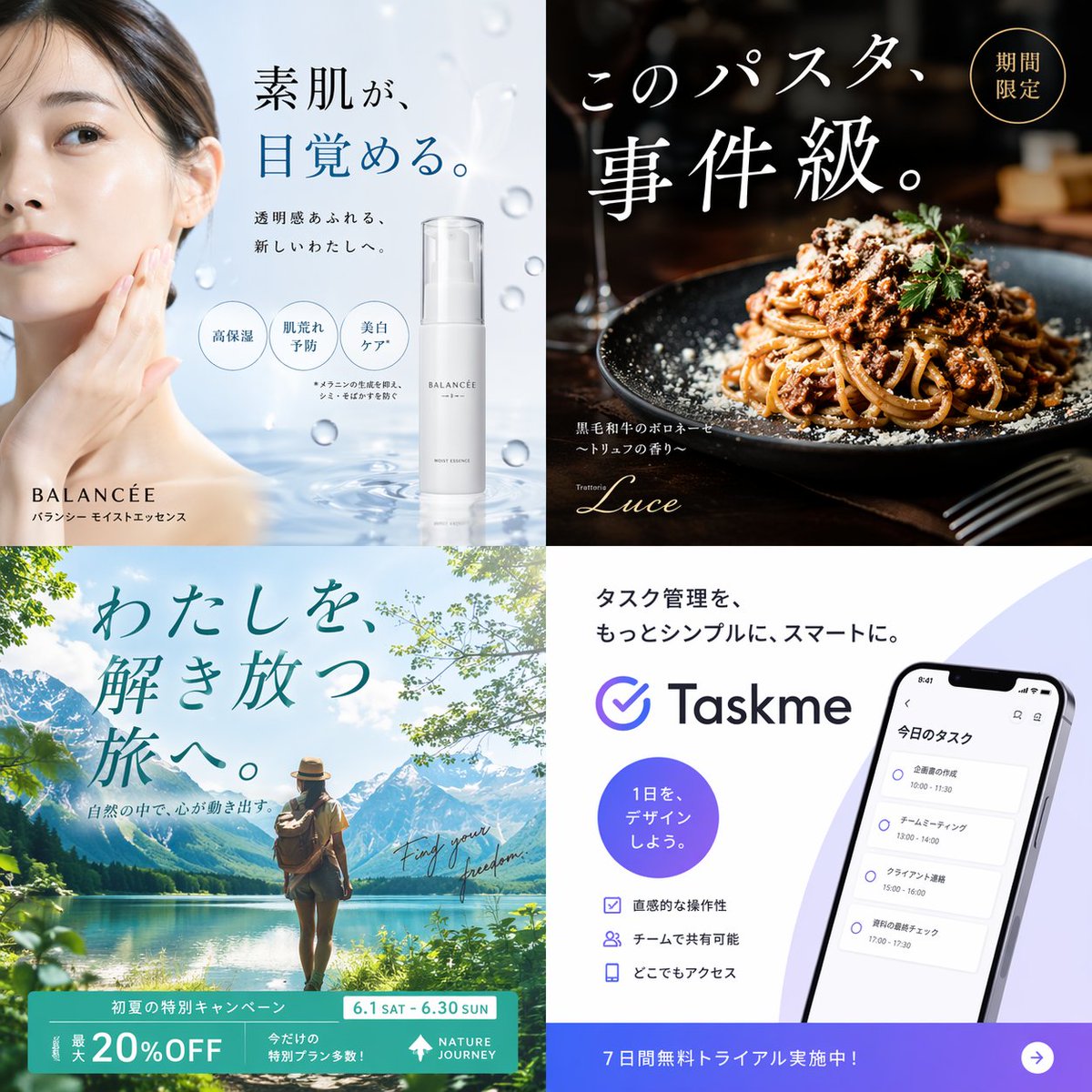
Case Notes
This page keeps the media, full prompt, and original source together so you can inspect the result first and decide whether the prompt is worth copying, saving, or comparing.
Case Insights
To make this page easier to search, cite, and reuse later, the case is also broken down into practical guidance about usage, visual cues, and prompt structure.
Best Fit Scenarios
- Use this as a ui & social screens benchmark when you need a fast style baseline before rewriting your own prompt.
- It is especially helpful if your target overlaps with UI, Screenshot, City Visual and you want to judge the image result before tuning wording.
- Keep it as a control sample when you compare nearby prompt variants one variable at a time.
Visual Signals To Notice
- The clearest style signals here are UI, Screenshot, City Visual, so those should usually stay in your first rewrite.
- The important layer is usually interface density, card hierarchy, and how the screen tells the story before you read small text.
- This case keeps one primary output, so the first image should be treated as the main visual reference.
How The Prompt Is Structured
- The prompt reads as a long, highly specified prompt, which is useful when you want to judge how much specificity this direction needs.
- Its keyword cluster is centered on UI, Screenshot, City Visual, so you can usually keep that cluster while swapping subject, camera, layout, or copy details.
- A practical rewrite path is: keep the outcome, keep the strongest style cues, then replace only the subject and environment blocks.
Good Follow-up Questions
- What changes first if you keep UI, Screenshot, City Visual but switch the subject matter?
- Which part of the result comes from section-level structure (UI & Social Screens) versus tag-level style cues?
- Which related cases in the same section give you a cleaner or more extreme variation of the same direction?
Full Prompt
{ "type": "2x2 advertising banner grid", "layout": "4 distinct quadrants, each featuring a different industry advertisement", "quadrants": [ { "position": "top-left", "industry": "skincare", "visuals": "Asian woman touching cheek, floating water droplets, white pump bottle", "brand": "BALANCÉE", "copy": { "headline": "{argument name=\"skincare headline\" default=\"素肌が、目覚める。\"}", "subheadline": "透明感あふれる、新しいわたしへ。", "features_count": 3, "features_labels": ["高保湿", "肌荒れ予防", "美白ケア*"] } }, { "position": "top-right", "industry": "restaurant food", "visuals": "close-up of spaghetti bolognese with grated cheese and parsley, dark moody lighting", "brand": "Trattoria Luce", "copy": { "headline": "{argument name=\"food headline\" default=\"このパスタ、事件級。\"}", "badge": "期間限定", "description": "黒毛和牛のボロネーゼ 〜トリュフの香り〜" } }, { "position": "bottom-left", "industry": "travel", "visuals": "woman with backpack facing a scenic mountain lake, bright daylight", "brand": "NATURE JOURNEY", "copy": { "headline": "{argument name=\"travel headline\" default=\"わたしを、解き放つ旅へ。\"}", "subheadline": "自然の中で、心が動き出す。", "script": "Find your freedom.", "banner_details": ["初夏の特別キャンペーン", "6.1 SAT - 6.30 SUN", "最大 20%OFF", "今だけの特別プラン多数!"] } }, { "position": "bottom-right", "industry": "SaaS app", "visuals": "smartphone displaying a task management app interface with 4 schedule items", "brand": "{argument name=\"app brand name\" default=\"Taskme\"}", "copy": { "headline": "{argument name=\"app headline\" default=\"タスク管理を、もっとシンプルに、スマートに。\"}", "circle_badge": "1日を、デザインしよう。", "features_count": 3, "features_labels": ["直感的な操作性", "チームで共有可能", "どこでもアクセス"], "bottom_banner": "7日間無料トライアル実施中!" } } ] }