Case Media
Case Notes
This page keeps the media, full prompt, and original source together so you can inspect the result first and decide whether the prompt is worth copying, saving, or comparing.
Case Insights
To make this page easier to search, cite, and reuse later, the case is also broken down into practical guidance about usage, visual cues, and prompt structure.
Best Fit Scenarios
- Use this as a ui & social screens benchmark when you need a fast style baseline before rewriting your own prompt.
- It is especially helpful if your target overlaps with Neon, Cinematic, Illustration and you want to judge the image result before tuning wording.
- Keep it as a control sample when you compare nearby prompt variants one variable at a time.
Visual Signals To Notice
- The clearest style signals here are Neon, Cinematic, Illustration, so those should usually stay in your first rewrite.
- The important layer is usually interface density, card hierarchy, and how the screen tells the story before you read small text.
- This case keeps one primary output, so the first image should be treated as the main visual reference.
How The Prompt Is Structured
- The prompt reads as a long, highly specified prompt, which is useful when you want to judge how much specificity this direction needs.
- Its keyword cluster is centered on Neon, Cinematic, Illustration, so you can usually keep that cluster while swapping subject, camera, layout, or copy details.
- A practical rewrite path is: keep the outcome, keep the strongest style cues, then replace only the subject and environment blocks.
Good Follow-up Questions
- What changes first if you keep Neon, Cinematic, Illustration but switch the subject matter?
- Which part of the result comes from section-level structure (UI & Social Screens) versus tag-level style cues?
- Which related cases in the same section give you a cleaner or more extreme variation of the same direction?
Full Prompt
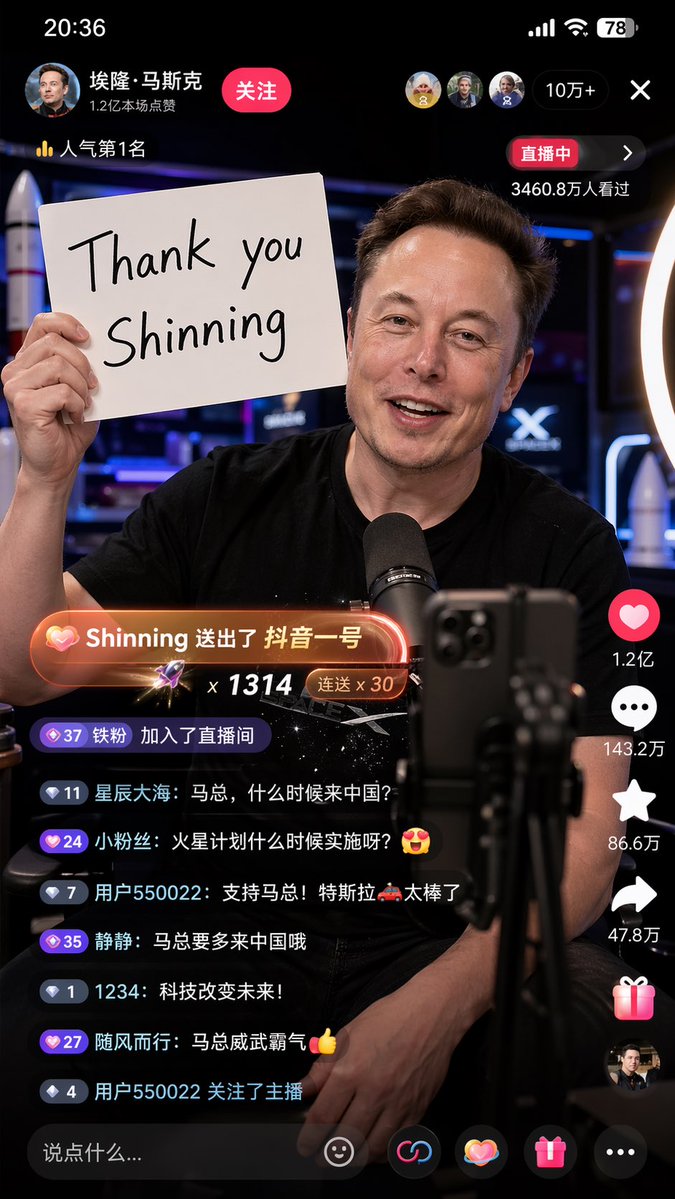
A 9:16 vertical version, high-detail realistic style Chinese TikTok live screenshot, Elon Musk is talking to the mobile phone camera in the live broadcast room, excited, smiling, and the live atmosphere is warm and real. He held a white handwritten sign in one hand, which clearly said: "Thank you Shinning". There are obvious Chinese TikTok interface elements in the live broadcast screen, including likes, comments and share icons arranged vertically on the right, scrolling Chinese bullet screens and interactive comments below, and the "live broadcast" logo at the top, which looks like a real mobile phone screenshot. There is an eye-catching gift prompt special effect in the screen: "Shinning sent TikTok No. 1", with gift animation light effect and platform-style prompt box. Musk is in a professional live broadcast environment, with a mobile phone holder, a ring fill light and a desktop microphone in front of him. The background is a modern technology live broadcast room with bright lights and a slight neon atmosphere. The composition is real and natural, like the ongoing live screenshot of the Chinese short video platform. The interface information is rich but not messy, the characters are clear, the expression is vivid, the details are rich, the sense of real photography, the depth of field, high definition, cinematic, photorealistic, realistic livestream screenshot, social media UI, Chinese Douyin live room, detailed lighting, natural skin texture. Negative prompts: Low definition, blur, cartoon, illustration, too strong CG sense, two-dimensional, deformed fingers, wrong text, scrambled code, multiple mobile phones, multiple brands, character repetition, face collapse, facial features distortion, excessive skin polishing, overexposure, too dark, messy background, wrong UI, non-Chinese short video interface, too many English bullet screens, gift special effects are not obvious, cropping error, proportional error Supplementary reinforcement words: Real mobile phone screen recording screenshot feeling, the live broadcast UI is complete, the gift prompt box conforms to the style of the Chinese short video platform, the Chinese comment area is active, the number of people online in the live broadcast room is clearly displayed, and the time, power and signal bar are visible.