案例媒体
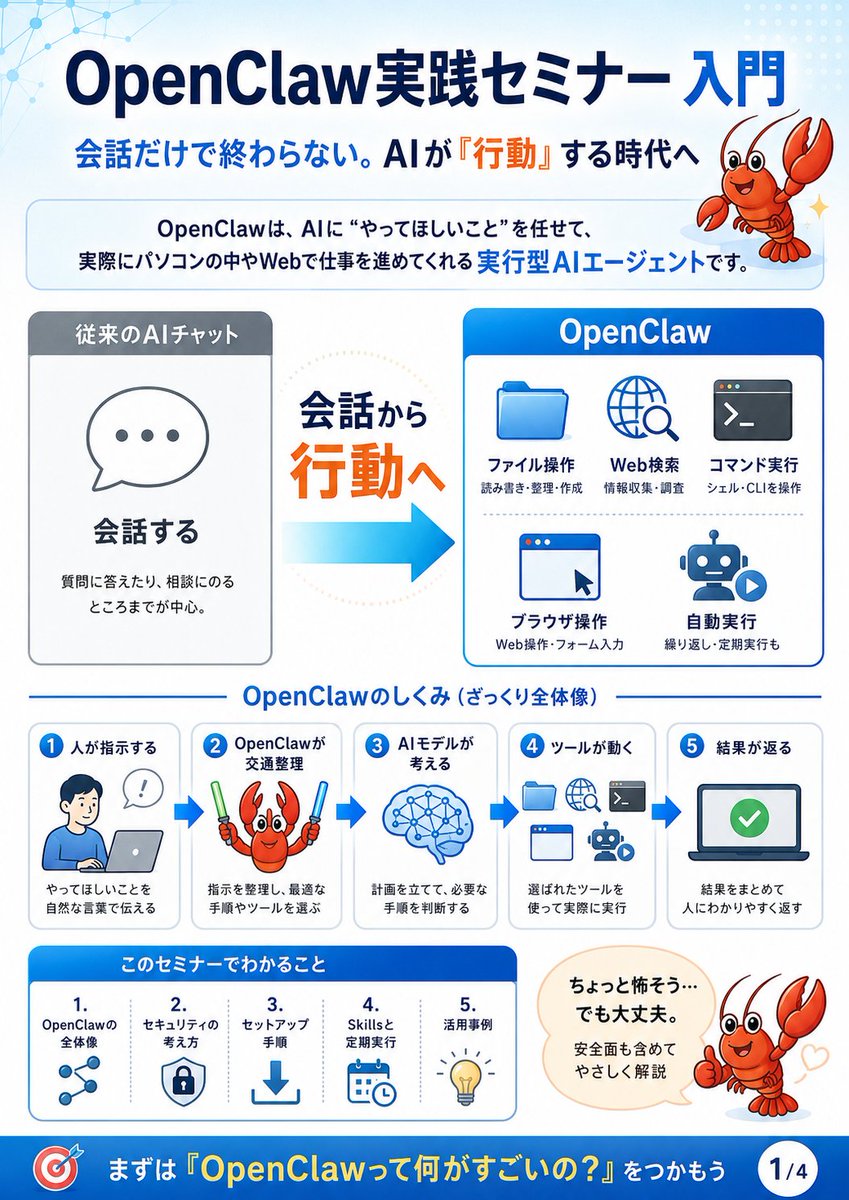
案例说明
这个页面把案例媒体、完整 Prompt 和出处放在一起,方便你先看结果,再判断这条 Prompt 是否值得复制、收藏或加入对比。
案例解读
为了方便搜索、引用和后续复用,这里会把案例的适用场景、画面重点和 Prompt 结构拆成更容易浏览的说明。
这类案例适合用在什么场景
- 把它当作 模型对比与社区 的基准案例最合适,先看成片方向,再决定自己的 Prompt 要往哪边改。
- 如果你的目标也落在 插画、截图、角色 这些方向,这条案例特别适合先看图判断风格,再回头微调描述。
- 做 Prompt 对比时,也很适合作为控制组,只改一个变量去看结果变化。
画面重点与风格信号
- 这条案例最明显的风格信号集中在 插画、截图、角色,所以第一次改写时最好先保留这些关键词。
- 这类案例最有价值的地方通常是看差异:到底改了什么、哪里崩了、是哪段 Prompt 造成的变化。
- 当前只有一张主图,所以第一张结果图就是最核心的参考基准。
Prompt 结构可以怎么理解
- 这条 Prompt 整体属于一条比较长、约束条件很多的 Prompt,很适合拿来判断这类方向到底需要写到多细。
- 关键词簇主要围绕 插画、截图、角色 展开,所以复用时可以先保留这组风格词,再替换主体、镜头、环境或文案信息。
- 最稳的改写方式通常是先保留结果方向和最强风格信号,只替换主体设定与场景块。
如果你是带着问题来的,可以先看这些角度
- 如果保留 插画、截图、角色,只换主体题材,结果最先变化的会是哪一部分?
- 这条结果里,哪些特征更像是 模型对比与社区 的结构特征,哪些又是标签风格本身带来的?
- 同分类的相关案例里,哪几条能给你更克制或更极致的相邻变体?
完整 Prompt
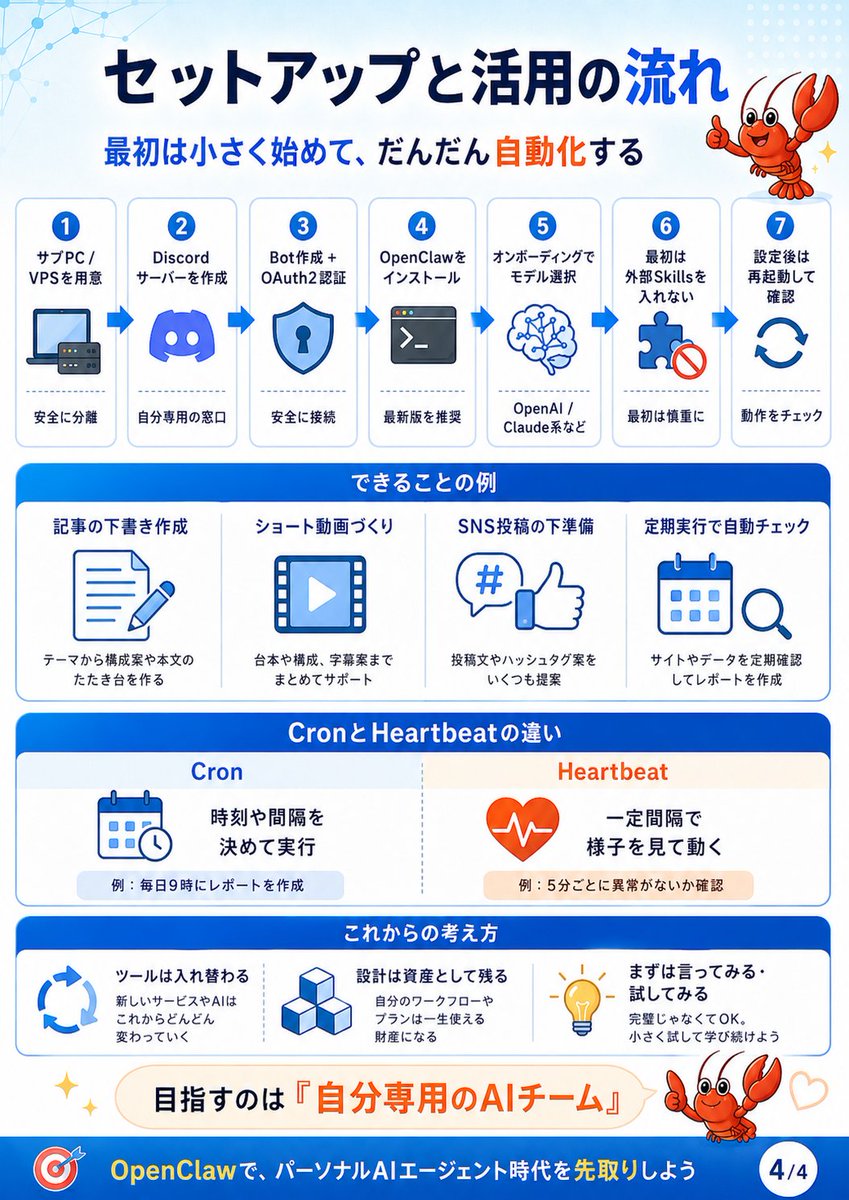
{"type":"Japanese educational infographic slide","format":"vertical 4-part seminar explainer, page indicator 1/4","visual_style":"clean corporate presentation design, white and pale blue background, rounded cards, blue gradient headers, orange emphasis text, flat vector icons, friendly mascot illustration, subtle network-node pattern in the upper left, crisp high-resolution typography","title":{"text":"{argument name=\"headline text\" default=\"OpenClaw実践セミナー 入門\"}","position":"top center","style":"large bold dark navy Japanese sans-serif with OpenClaw in Latin letters"},"subtitle":{"text":"{argument name=\"subtitle text\" default=\"会話だけで終わらない。AIが『行動』する時代へ\"}","position":"below title","style":"bold navy text with the word 『行動』 highlighted in orange"},"mascot":{"character":"{argument name=\"mascot character\" default=\"cute red cartoon lobster\"}","appearances_count":3,"appearances":[{"position":"top right","description":"smiling red lobster mascot with raised claws beside the headline"},{"position":"middle workflow step 2","description":"red lobster holding two glow sticks, representing OpenClaw choosing tools"},{"position":"lower right","description":"red lobster giving a thumbs-up next to a reassuring speech bubble with small heart marks"}]},"intro_box":{"position":"under subtitle","text":"OpenClawは、AIに“やってほしいこと”を任せて、実際にパソコンの中やWebで仕事を進めてくれる 実行型AIエージェントです。","style":"rounded pale-blue bordered banner with key phrase 実行型AIエージェント in bright blue"},"main_comparison":{"position":"center","sections_count":3,"sections":[{"title":"従来のAIチャット","position":"left","description":"gray headed card with a speech bubble icon containing three dots","main_label":"会話する","supporting_text":"質問に答えたり、相談にのるところまでが中心。"},{"title":"会話から 行動へ","position":"center","description":"large transition message with 行動へ in orange and a thick cyan arrow pointing right"},{"title":"OpenClaw","position":"right","description":"blue headed card showing five action capabilities","capabilities_count":5,"capabilities":[{"label":"ファイル操作","icon":"blue folder","small_text":"読み書き・整理・作成"},{"label":"Web検索","icon":"globe with magnifying glass","small_text":"情報収集・調査"},{"label":"コマンド実行","icon":"terminal window","small_text":"シェル・CLIを操作"},{"label":"ブラウザ操作","icon":"browser window with cursor","small_text":"Web操作・フォーム入力"},{"label":"自動実行","icon":"robot with play button","small_text":"繰り返し・定期実行も"}]}]},"mechanism_section":{"title":"OpenClawのしくみ(ざっくり全体像)","position":"lower middle","steps_count":5,"layout":"five connected rounded cards with blue arrows between them","steps":[{"number":"1","label":"人が指示する","icon":"person at laptop with speech bubble","text":"やってほしいことを自然な言葉で伝える"},{"number":"2","label":"OpenClawが交通整理","icon":"lobster with glow sticks","text":"指示を整理し、最適な手順やツールを選ぶ"},{"number":"3","label":"AIモデルが考える","icon":"blue brain with network nodes","text":"計画を立てて、必要な手順を判断する"},{"number":"4","label":"ツールが動く","icon":"folder, globe, terminal, browser, robot icons","text":"選ばれたツールを使って実際に実行"},{"number":"5","label":"結果が返る","icon":"laptop screen with green check mark","text":"結果をまとめて人にわかりやすく返す"}]},"learning_section":{"title":"このセミナーでわかること","position":"bottom left","items_count":5,"items":[{"number":"1.","label":"OpenClawの全体像","icon":"connected nodes"},{"number":"2.","label":"セキュリティの考え方","icon":"shield with lock"},{"number":"3.","label":"セットアップ手順","icon":"download arrow"},{"number":"4.","label":"Skillsと定期実行","icon":"calendar and clock"},{"number":"5.","label":"活用事例","icon":"lightbulb"}]},"speech_bubble":{"position":"bottom right","text":"{argument name=\"speech bubble text\" default=\"ちょっと怖そう…でも大丈夫。安全面も含めてやさしく解説\"}","style":"cream rounded speech bubble pointing to thumbs-up lobster"},"footer":{"position":"very bottom","style":"deep blue banner","left_icon":"red and blue target icon","call_to_action":"{argument name=\"footer call to action\" default=\"まずは『OpenClawって何がすごいの?』をつかもう\"}","page_badge":"1/4"},"color_palette":"navy blue, bright cyan, white, pale blue, orange accents, gray panels, red mascot","composition":"balanced infographic with large title at top, explanatory comparison in the center, step-by-step process below, seminar takeaways and reassurance message at the bottom"}