Case Media
Case Notes
This page keeps the media, full prompt, and original source together so you can inspect the result first and decide whether the prompt is worth copying, saving, or comparing.
Case Insights
To make this page easier to search, cite, and reuse later, the case is also broken down into practical guidance about usage, visual cues, and prompt structure.
Best Fit Scenarios
- Use this as a ui & social screens benchmark when you need a fast style baseline before rewriting your own prompt.
- It is especially helpful if your target overlaps with Cinematic, Poster, UI and you want to judge the image result before tuning wording.
- Keep it as a control sample when you compare nearby prompt variants one variable at a time.
Visual Signals To Notice
- The clearest style signals here are Cinematic, Poster, UI, so those should usually stay in your first rewrite.
- The important layer is usually interface density, card hierarchy, and how the screen tells the story before you read small text.
- This case keeps one primary output, so the first image should be treated as the main visual reference.
How The Prompt Is Structured
- The prompt reads as a long, highly specified prompt, which is useful when you want to judge how much specificity this direction needs.
- Its keyword cluster is centered on Cinematic, Poster, UI, so you can usually keep that cluster while swapping subject, camera, layout, or copy details.
- A practical rewrite path is: keep the outcome, keep the strongest style cues, then replace only the subject and environment blocks.
Good Follow-up Questions
- What changes first if you keep Cinematic, Poster, UI but switch the subject matter?
- Which part of the result comes from section-level structure (UI & Social Screens) versus tag-level style cues?
- Which related cases in the same section give you a cleaner or more extreme variation of the same direction?
Full Prompt
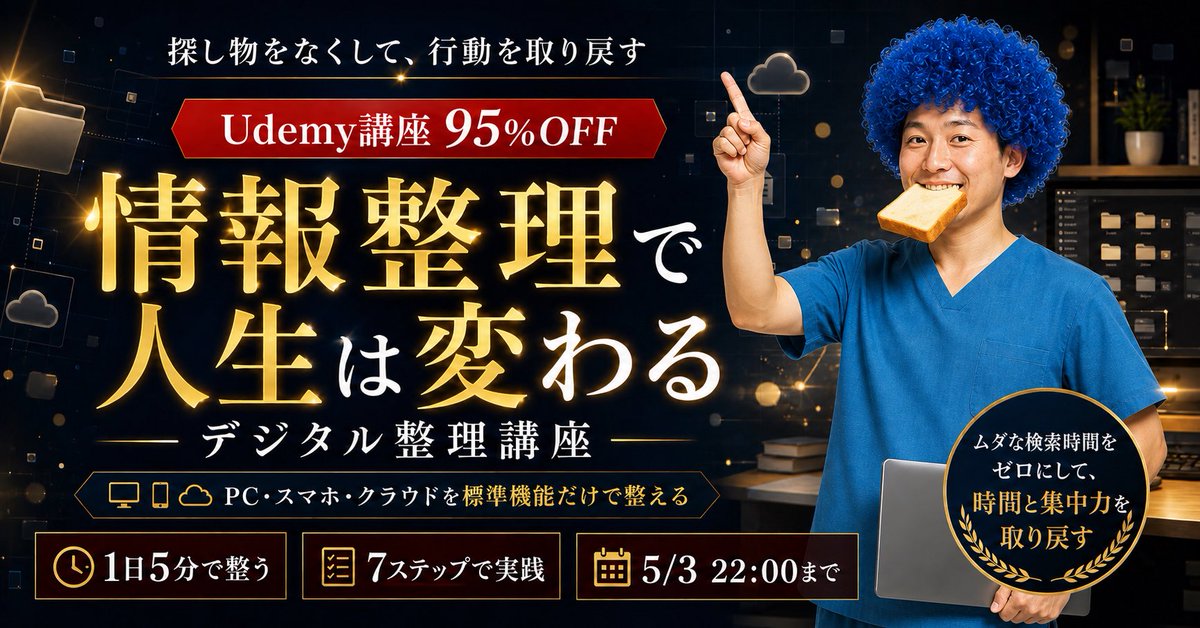
{"type":"Japanese Udemy course promotional thumbnail / social media banner","aspect_ratio":"wide 16:9, 1200x675 style","overall_style":"high-conversion online course ad, premium dark navy and black digital workspace background, glowing gold typography, cinematic lighting, sharp commercial compositing, dramatic contrast, bokeh particles, subtle tech UI squares and cloud/file icons","main_subject":{"position":"right third","description":"adult presenter from waist up wearing bright blue medical-scrub-like top, face intentionally blurred or covered by a soft rectangular mosaic for anonymity, curly vivid blue afro-style hair, one arm raised with index finger pointing upward, other arm holding a closed silver laptop against the body","expression":"not visible due to face blur","pose":"confident instructor pose pointing to the top-left offer banner"},"background":{"setting":"dark office or study room with shelves and storage boxes, warm desk lamp glow, floating digital folder and cloud motifs, scattered gold light particles and thin geometric lines","mood":"organized, trustworthy, digital productivity"},"typography":{"primary_headline":"{argument name=\"main headline text\" default=\"情報整理で人生は変わる\"}","headline_position":"large center-left, stacked in multiple lines","headline_style":"oversized Japanese Mincho/serif type, gold gradient with bright outer glow and subtle shadow; the smaller connecting characters are white","top_copy":"{argument name=\"top copy\" default=\"探し物をなくして、行動を取り戻す\"}","top_copy_position":"top center-left in white Japanese serif text","subheadline":"{argument name=\"course subtitle\" default=\"デジタル整理講座\"}","subheadline_position":"below headline centered-left with thin horizontal gold divider lines","offer_banner":{"position":"upper left below top copy","shape":"red horizontal ribbon with angled ends and gold outline","text":"{argument name=\"offer text\" default=\"Udemy講座 95%OFF\"}","style":"white bold serif text, large 95%OFF emphasized"}},"layout":{"sections":[{"title":"top message","position":"top center-left","count":1,"labels":["探し物をなくして、行動を取り戻す"]},{"title":"red discount ribbon","position":"upper left","count":1,"labels":["Udemy講座 95%OFF"]},{"title":"main headline block","position":"center-left","count":1,"labels":["情報整理で人生は変わる"]},{"title":"course subtitle block","position":"lower center-left","count":1,"labels":["デジタル整理講座"]},{"title":"device feature strip","position":"below subtitle","count":3,"labels":["PC","スマホ","クラウド"]},{"title":"bottom benefit cards","position":"bottom row","count":3,"labels":["1日5分で整う","7ステップで実践","5/3 22:00まで"]},{"title":"round benefit badge","position":"lower right overlapping laptop","count":1,"labels":["ムダな検索時間をゼロにして、時間と集中力を取り戻す"]}]},"graphic_elements":{"bottom_cards":"three rectangular dark cards with thin gold borders, each with one gold icon: clock icon for 1日5分で整う, checklist icon for 7ステップで実践, calendar icon for 5/3 22:00まで","feature_strip":"dark elongated outlined plaque with small gold icons for desktop monitor, smartphone, and cloud followed by white text PC・スマホ・クラウドを標準機能だけで整える","badge":"black circular seal with gold rim and laurel leaves, mixed white and gold Japanese text, placed over the presenter and laptop","decorations":"glowing file folder icon at far left, small cloud icons, floating squares, gold sparkles and lens flare accents"},"color_palette":"black, midnight navy, luminous gold, white, crimson red, bright scrub blue, warm amber highlights","composition":"left side dominated by text hierarchy and promotional information, right side dominated by human presenter; ensure all Japanese text is crisp, readable, correctly spelled, and arranged like a professional Udemy sale thumbnail","negative_prompt":"no extra people, no unreadable gibberish, no distorted hands, no duplicated fingers, no random English text, no clutter covering the headline"}