Case Media
Case Notes
This page keeps the media, full prompt, and original source together so you can inspect the result first and decide whether the prompt is worth copying, saving, or comparing.
Case Insights
To make this page easier to search, cite, and reuse later, the case is also broken down into practical guidance about usage, visual cues, and prompt structure.
Best Fit Scenarios
- Use this as a ui & social screens benchmark when you need a fast style baseline before rewriting your own prompt.
- It is especially helpful if your target overlaps with Portrait, Cinematic, Poster and you want to judge the image result before tuning wording.
- Keep it as a control sample when you compare nearby prompt variants one variable at a time.
Visual Signals To Notice
- The clearest style signals here are Portrait, Cinematic, Poster, so those should usually stay in your first rewrite.
- The important layer is usually interface density, card hierarchy, and how the screen tells the story before you read small text.
- This case keeps one primary output, so the first image should be treated as the main visual reference.
How The Prompt Is Structured
- The prompt reads as a long, highly specified prompt, which is useful when you want to judge how much specificity this direction needs.
- Its keyword cluster is centered on Portrait, Cinematic, Poster, so you can usually keep that cluster while swapping subject, camera, layout, or copy details.
- A practical rewrite path is: keep the outcome, keep the strongest style cues, then replace only the subject and environment blocks.
Good Follow-up Questions
- What changes first if you keep Portrait, Cinematic, Poster but switch the subject matter?
- Which part of the result comes from section-level structure (UI & Social Screens) versus tag-level style cues?
- Which related cases in the same section give you a cleaner or more extreme variation of the same direction?
Full Prompt
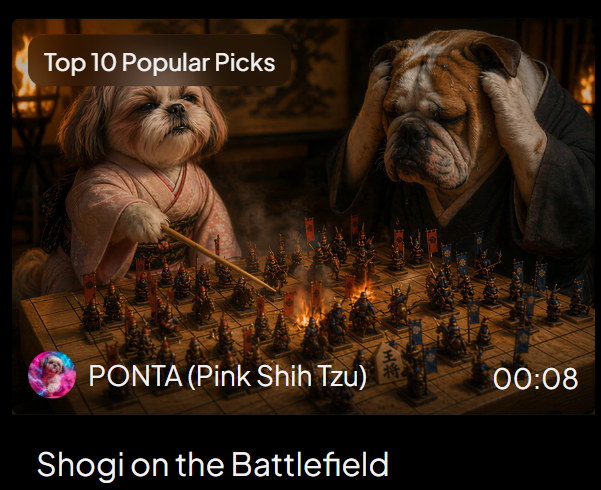
Goal: Create a cinematic social media video thumbnail / award post image showing a fantasy shogi match transforming into a battlefield, with a dark PixVerse-style video-card presentation. Canvas: 600×483 px landscape card on a black background with rounded corners. The upper 82% is a cinematic image still; the lower strip is black with a large title. Use warm firelight, deep shadows, shallow depth of field, dramatic movie lighting, and high-detail photorealistic animal characters. Main scene: Inside a dim traditional Japanese room, two anthropomorphic dogs sit across a wooden shogi board that has become a miniature battlefield. On the left is {argument name="left character" default="PONTA, a pink Shih Tzu"}, small and fluffy, wearing a pale pink kimono, holding a thin wooden pointer toward the board with a confident strategic expression. On the right is {argument name="right character" default="a worried bulldog opponent"}, large and wrinkled, wearing a dark robe, gripping both sides of his head in despair. Behind them are blurred lanterns, flames, and traditional wall art. Board details: The shogi board fills the lower center of the image in perspective. Show a dense miniature battle scene on top of the grid: exactly two opposing armies, one accented in red/orange and one accented in blue. Include about 64 visible miniature soldier figures total, mixed with shogi pieces, banners, spears, and glowing embers. A bright fiery clash burns near the center of the board. Make the wooden grid and at least one shogi piece with Japanese characters visible near the front edge. Overlay text and UI: Add a rounded dark-brown pill label at the top left reading {argument name="award label" default="Top 10 Popular Picks"} in white sans-serif text. At the lower left of the image still, place a circular colorful avatar icon followed by white text reading {argument name="creator line" default="PONTA (Pink Shih Tzu)"}. At the lower right of the image still, place the white duration text {argument name="duration" default="00:08"}. In the black bottom area, add the large white title text {argument name="video title" default="Shogi on the Battlefield"} aligned left. Visible discrete text elements: exactly 4 text elements: the award label, the creator line, the duration, and the bottom title. Visible major characters: exactly 2 dogs. Visible UI elements: exactly 1 rounded award pill, exactly 1 circular avatar, exactly 1 video duration marker, exactly 1 bottom title area. Style constraints: photorealistic yet fantastical, cinematic, warm orange highlights, dark vignette, high contrast, crisp central details, no extra logos, no watermark, no additional captions beyond the specified text.