Case Media
Case Notes
This page keeps the media, full prompt, and original source together so you can inspect the result first and decide whether the prompt is worth copying, saving, or comparing.
Case Insights
To make this page easier to search, cite, and reuse later, the case is also broken down into practical guidance about usage, visual cues, and prompt structure.
Best Fit Scenarios
- Use this as a ui & social screens benchmark when you need a fast style baseline before rewriting your own prompt.
- It is especially helpful if your target overlaps with Portrait, Poster, Illustration and you want to judge the image result before tuning wording.
- Keep it as a control sample when you compare nearby prompt variants one variable at a time.
Visual Signals To Notice
- The clearest style signals here are Portrait, Poster, Illustration, so those should usually stay in your first rewrite.
- The important layer is usually interface density, card hierarchy, and how the screen tells the story before you read small text.
- This case keeps 2 media outputs, which makes it easier to check whether the style remains stable across multiple results.
How The Prompt Is Structured
- The prompt reads as a long, highly specified prompt, which is useful when you want to judge how much specificity this direction needs.
- Its keyword cluster is centered on Portrait, Poster, Illustration, so you can usually keep that cluster while swapping subject, camera, layout, or copy details.
- A practical rewrite path is: keep the outcome, keep the strongest style cues, then replace only the subject and environment blocks.
Good Follow-up Questions
- What changes first if you keep Portrait, Poster, Illustration but switch the subject matter?
- Which part of the result comes from section-level structure (UI & Social Screens) versus tag-level style cues?
- Which related cases in the same section give you a cleaner or more extreme variation of the same direction?
Full Prompt
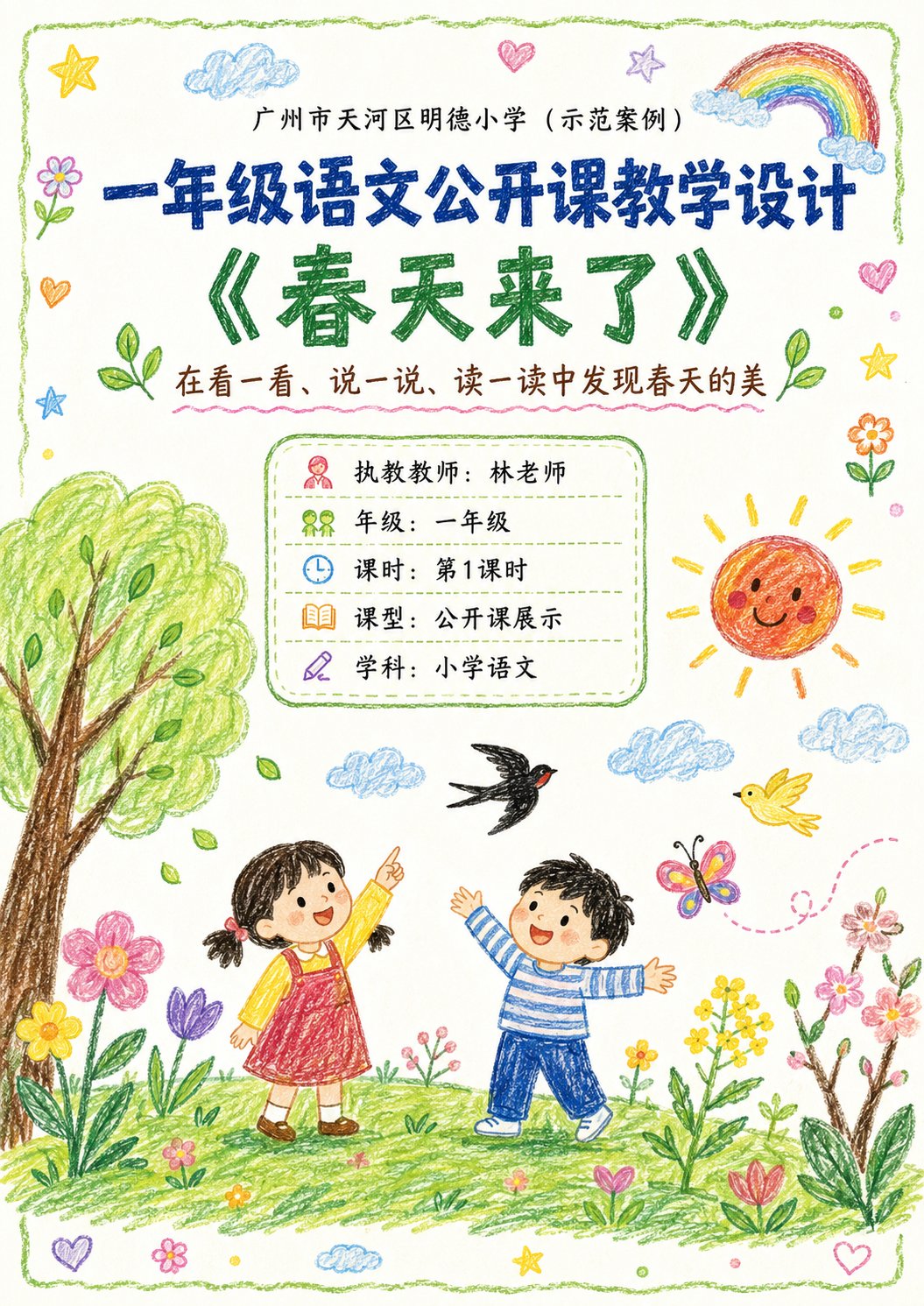
Generate a set of 'Public Class Crayon-Style Visualized Lesson Plan' images based on the lesson topic, teaching information, and page content provided by the user. 【Task Goal】 Generate a set of lesson plan page images that are stylistically unified and suitable for public class displays. Each image should be output independently, do not combine them into one long image. Overall use: Primary school lower grade Chinese public class display, parent observation, home-school committee observation, principal/dean review, also suitable as printable display-style lesson plan pages. 【Applicable Scenarios】 - Primary school lower grades (Year 1, Year 2 priority) - Public classes / Demonstration classes / Teaching displays - Subject priority: Primary school Chinese (can be extended to Math, English, etc.) - Style: Neither childish graffiti nor rigid official documents, but 'children's crayon visuals + clear teaching logic + public class display sense' ━━━━━━━━━━━━━━━━━━ I. Input Methods (Two modes supported) ━━━━━━━━━━━━━━━━━━ 【Mode A: User manually fills in content】 If the user directly provides school, topic, teacher, teaching objectives, teaching process, etc., please arrange strictly according to the content provided by the user. 【Mode B: User uploads original lesson plan / document / text content】 If the user uploads original lesson plan content or posts the full lesson plan text, please first understand and summarize the content, then automatically organize it into a version suitable for multi-page display. Requirements: 1. Retain the core teaching logic of the original lesson plan 2. Compress wordy text, enhance visualization and display sense 3. Prioritize extracting: Topic, objectives, student analysis, key points/difficulties, process, blackboard design, post-class extension, home-school co-education tips 4. Do not mechanically copy the original text, transform it into layout language suitable for display pages ━━━━━━━━━━━━━━━━━━ II. Output Quantity Rules (Important) ━━━━━━━━━━━━━━━━━━ 【Default Output Quantity】 Generate 4 images by default. 【Customizable Quantity】 If the user explicitly specifies a number, execute according to the user-specified quantity. For example: - 1 image: Condensed version for single-page display - 2 images: Cover + Core content - 3 images: Cover + Analysis page + Process page - 4 images: Cover + Analysis page + Process (Part 1) + Process (Part 2) (Default recommended) - 5 or more images: Divide into more detailed content pages while maintaining a unified style. 【Automatic Allocation Principles】 If the user-specified count does not match the content volume perfectly, please automatically split the content reasonably, requiring: 1. Balanced content distribution 2. Avoid empty fronts and crowded ends 3. Each image should have a clear theme 4. Cover page is prioritized 5. Merge content appropriately when the page count is low 6. Sub-divide teaching process, blackboard design, home-school co-education, highlight pages, etc., when the page count is high ━━━━━━━━━━━━━━━━━━ III. Fixed Visual Rules ━━━━━━━━━━━━━━━━━━ 【Aspect Ratio】 Portrait, close to A4 paper ratio. Recommended ratio: 1000:1414 or similar. 【Overall Style】 10-year-old child's crayon hand-drawn style / Colored crayon style / Children's hand-drawn public class lesson plan style. Requirements: - White or warm white paper background - Obvious crayon strokes, children's hand-drawn texture - Lines are natural, slightly clumsy, but neat and clear overall - Bright and warm colors, mainly using soft crayon colors like red, yellow, blue, green, pink, orange - Overall appearance is 'serious yet child-like primary school public class display page' - Not too flashy, nor too rudimentary - Must have readability, display sense, and layering - Do not make it like a kindergarten poster, nor like a regular Word screenshot 【Layout Requirements】 - Each page must have a clear title - Large title can be used on the cover page - Do not repeat large cover-style titles on internal pages - Internal pages should only keep small headers or page titles at the top, do not occupy too much body space - The main content area should be sufficient to highlight information and teaching logic - Clear module division - Clear information hierarchy - Strong text readability - Moderate white space - Decorative elements serve the content and should not overshadow it - Suitable for printing and display 【Decorative Elements】 Appropriate use of children's crayon-style decorative elements: - Small flowers, clouds, sun, rainbows, stars, leaves, birds, butterflies, grass, hearts - Small illustrations related to the course topic can be added - Decorations should be moderate, naturally distributed, not cluttering the whole page 【Font Appearance】 - Chinese titles can be made to look like crayon handwriting or children's brushstrokes - Body text must be clear and easy to read - Do not use fonts that are too flashy or difficult to recognize - Do not have large areas of dense, long paragraphs of text ━━━━━━━━━━━━━━━━━━ IV. Page Structure Suggestions (Default 4P, adjustable by quantity) ━━━━━━━━━━━━━━━━━━ 【Suggested structure for default 4 images】 P1 Cover page P2 Teaching analysis and objective design P3 Teaching process (Part 1) P4 Teaching process (Part 2) + Blackboard design + Extension 【Adjust according to the following logic if customizing quantity】 1 image: - Condensed overview page - Includes: Cover info + Teaching objectives + Core process + Highlights summary 2 images: - Image 1: Cover + Teaching objectives / Student analysis / Key points & difficulties - Image 2: Teaching process + Blackboard design + Extension 3 images: - Image 1: Cover - Image 2: Teaching analysis and objective design - Image 3: Teaching process + Summary & extension 4 images (Default recommendation): - Image 1: Cover page - Image 2: Teaching analysis and objective design - Image 3: Teaching process (Part 1) - Image 4: Teaching process (Part 2) + Blackboard design + Home-school co-education + Public class highlights 5 images or more: Can be further divided into: - Cover page - Teaching analysis page - Teaching objectives / Key points & difficulties page - Teaching process (Part 1) - Teaching process (Part 2) - Blackboard design page - Home-school co-education page - Public class highlights / Summary page ━━━━━━━━━━━━━━━━━━ V. Content Requirements for Various Pages ━━━━━━━━━━━━━━━━━━ 【Cover Page】 Content includes: - School name (can write 'XX City XX District XX Primary School (Demonstration Case)') - Course type (e.g., Year 1 Chinese public class teaching design) - Topic name (e.g., 'Spring is Here') - Subtitle / Teaching slogan (1 sentence) - Teacher - Grade - Class period - Class type - Subject Visual requirements: - Cover visual is the most complete and catchy - Can add child-like crayon scene illustrations related to the topic - The picture is warm, child-like, has spring atmosphere (or matches the topic) - Looks like a lesson plan cover and a public class display page 【Teaching Analysis Pages】 Can include: - Student analysis - Teaching objectives - Teaching key points - Teaching difficulties - Teaching preparation - Classroom evaluation Visual requirements: - Each module can be housed in an independent rounded box / hand-drawn border - Each module has simple icons - Clear logic, suitable for display - Not too crowded 【Teaching Process Pages】 Can include: - Segment name - Time - Teacher activities - Student activities - Design intention - Evaluation observation points (optional) Visual requirements: - Can be arranged in vertical flow / segment card style / timeline - Each segment has an independent module - Small illustrations can be added to assist understanding - Clear page, rhythmic feel 【Summary / Extension Pages】 Can include: - Classroom summary - Post-class extension - Blackboard design - Home-school co-education tips - Public class highlights Visual requirements: - Can be laid out with primary and secondary focus - Blackboard design can be a separate module on the right - Home-school co-education and highlights can be auxiliary display modules - Complete page information, but kept clean ━━━━━━━━━━━━━━━━━━ VI. Content Organization Principles ━━━━━━━━━━━━━━━━━━ 1. If the content provided by the user is long, compress it into expressions suitable for display page reading 2. Retain teacher professionalism, but do not make it too administrative or official 3. Language should be suitable for the primary school lower grade public class scenario 4. Let teachers, parents, and principals understand and feel the design sense 5. Have both child-like affinity and professional credibility 6. Not a pure illustration poster, but 'visualized lesson plan / teaching design page' 7. Information on each page should be rich but not messy 8. Style of each page must be unified, like the same series of works 9. If page count changes, automatically rebalance content, do not mechanically apply a 4-page template ━━━━━━━━━━━━━━━━━━ VII. If the user does not provide complete content, please fill in according to the following information template ━━━━━━━━━━━━━━━━━━ Please generate based on the following fields: - Quantity (optional, default 4): - School name: - Grade: - Subject: - Topic name: - Teacher: - Class period: - Class type: - Subtitle / Teaching slogan: - Teaching objectives: - Student analysis: - Key points: - Difficulties: - Teaching preparation: - Teaching process: - Blackboard design: - Classroom summary: - Post-class extension: - Home-school co-education tips: - Public class highlights: If the user does not fill it out completely, please automatically and reasonably complete it based on the topic, but maintain authenticity, naturalness, and conformity to primary school lower grade public class logic. ━━━━━━━━━━━━━━━━━━ VIII. Generation Requirement Summary ━━━━━━━━━━━━━━━━━━ Please final output: - If the user does not specify a quantity, default to output 4 independent portrait A4 crayon-style public class lesson plan images - If the user specifies a quantity, output according to the specified quantity - Unified style - Real content - Clear layout - Suitable for public class display - Suitable for parents, home-school committee, principals, and deans to watch - Do not over-decorate - Do not be too rudimentary - Do not make into regular document screenshots - Must have a balance of 'Children's crayon style + professional teaching design sense'