Case Media
Case Notes
This page keeps the media, full prompt, and original source together so you can inspect the result first and decide whether the prompt is worth copying, saving, or comparing.
Case Insights
To make this page easier to search, cite, and reuse later, the case is also broken down into practical guidance about usage, visual cues, and prompt structure.
Best Fit Scenarios
- Use this as a ui & social screens benchmark when you need a fast style baseline before rewriting your own prompt.
- It is especially helpful if your target overlaps with Neon, Portrait, Cinematic and you want to judge the image result before tuning wording.
- Keep it as a control sample when you compare nearby prompt variants one variable at a time.
Visual Signals To Notice
- The clearest style signals here are Neon, Portrait, Cinematic, so those should usually stay in your first rewrite.
- The important layer is usually interface density, card hierarchy, and how the screen tells the story before you read small text.
- This case keeps one primary output, so the first image should be treated as the main visual reference.
How The Prompt Is Structured
- The prompt reads as a long, highly specified prompt, which is useful when you want to judge how much specificity this direction needs.
- Its keyword cluster is centered on Neon, Portrait, Cinematic, so you can usually keep that cluster while swapping subject, camera, layout, or copy details.
- A practical rewrite path is: keep the outcome, keep the strongest style cues, then replace only the subject and environment blocks.
Good Follow-up Questions
- What changes first if you keep Neon, Portrait, Cinematic but switch the subject matter?
- Which part of the result comes from section-level structure (UI & Social Screens) versus tag-level style cues?
- Which related cases in the same section give you a cleaner or more extreme variation of the same direction?
Full Prompt
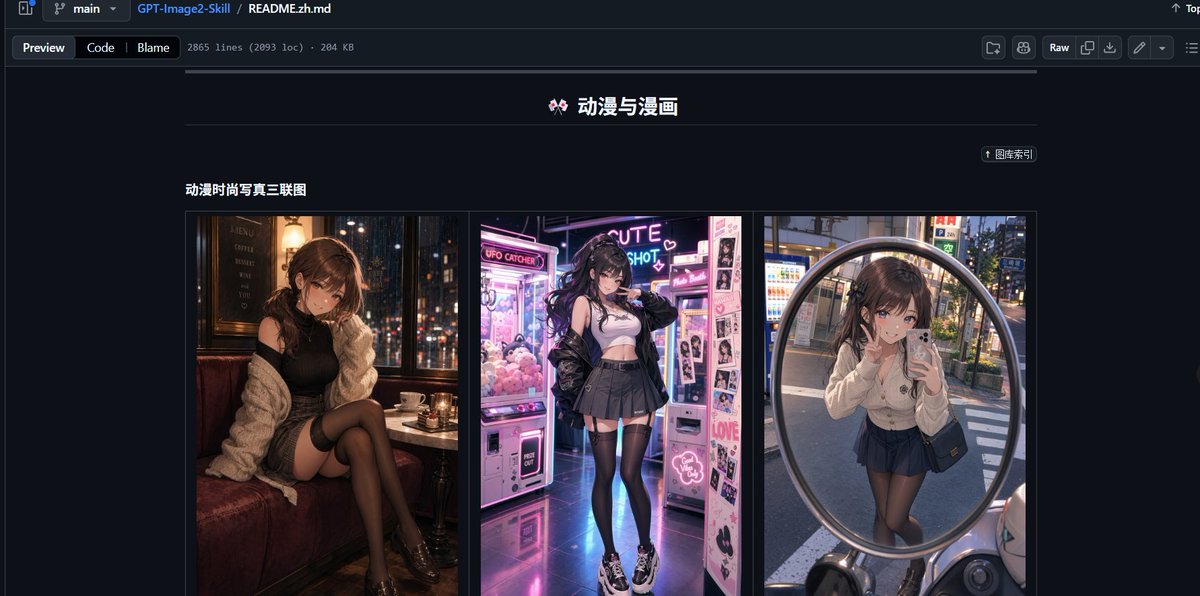
Goal: Create a realistic desktop browser screenshot of a GitHub repository README page in dark mode, showcasing an image-prompt collection. The page should look like GitHub’s file preview interface, with the repository path and README file visible at the top. Canvas: Wide 16:9 screenshot, approximately 1200×565 px, dark navy/black GitHub UI, sharp interface details, no browser address bar. Top interface: Show a GitHub-style header and breadcrumb bar with branch selector “main”, repository name “GPT-Image2-Skill”, and file path “README.zh.md”. Under it, include tabs/buttons “Preview”, “Code”, and “Blame”, plus small metadata text reading approximately “2865 lines (2093 loc) · 204 KB”. On the right side include typical GitHub controls such as “Raw” and small icon buttons. Main README content: Center the content column on a dark background. At the top of the visible README section, place a centered Chinese title with a small decorative emoji: “🎀 动漫与漫画”. Beneath it, draw a thin horizontal divider line. On the upper right of the content area, include a small pill-shaped link button labeled “↑ 图库索引”. Section: Below the divider, add a bold subsection title on the left: “动漫时尚写真三联图”. Under this title, create one bordered gallery row containing exactly 3 vertical image panels placed side by side with narrow gaps: 1. Left panel: anime-fashion style portrait of a young woman sitting in a cozy dim café booth at night, warm lamps, city lights outside the window, black outfit, cream cardigan, black stockings, moody cinematic lighting; face intentionally blurred or pixelated. 2. Center panel: anime-fashion style full-body portrait of a young woman in a neon arcade or photo booth area, pink and purple glowing claw machines and sticker photo machines, white crop top, black jacket, pleated skirt, thigh-high stockings, chunky sneakers; face intentionally blurred or pixelated. 3. Right panel: anime-fashion style mirror selfie reflected in a large round convex street mirror in an urban Japanese street, vending machines and evening city background, cream cardigan, dark pleated skirt, black stockings, small shoulder bag; face intentionally blurred or pixelated. Visual style: Highly realistic GitHub dark-mode screenshot combined with vivid anime-fashion thumbnail imagery. Use crisp UI typography, thin borders, muted gray separators, and a dark navy page background. Keep the thumbnails colorful and glossy while the surrounding GitHub interface remains subdued. Text constraints: Preserve the visible Chinese labels exactly where shown: “动漫与漫画”, “图库索引”, and “动漫时尚写真三联图”. Do not add extra README sections, comments, watermarks, or unrelated text. The final image should resemble a social media screenshot demonstrating a repository’s built-in prompt presets.