Case Media
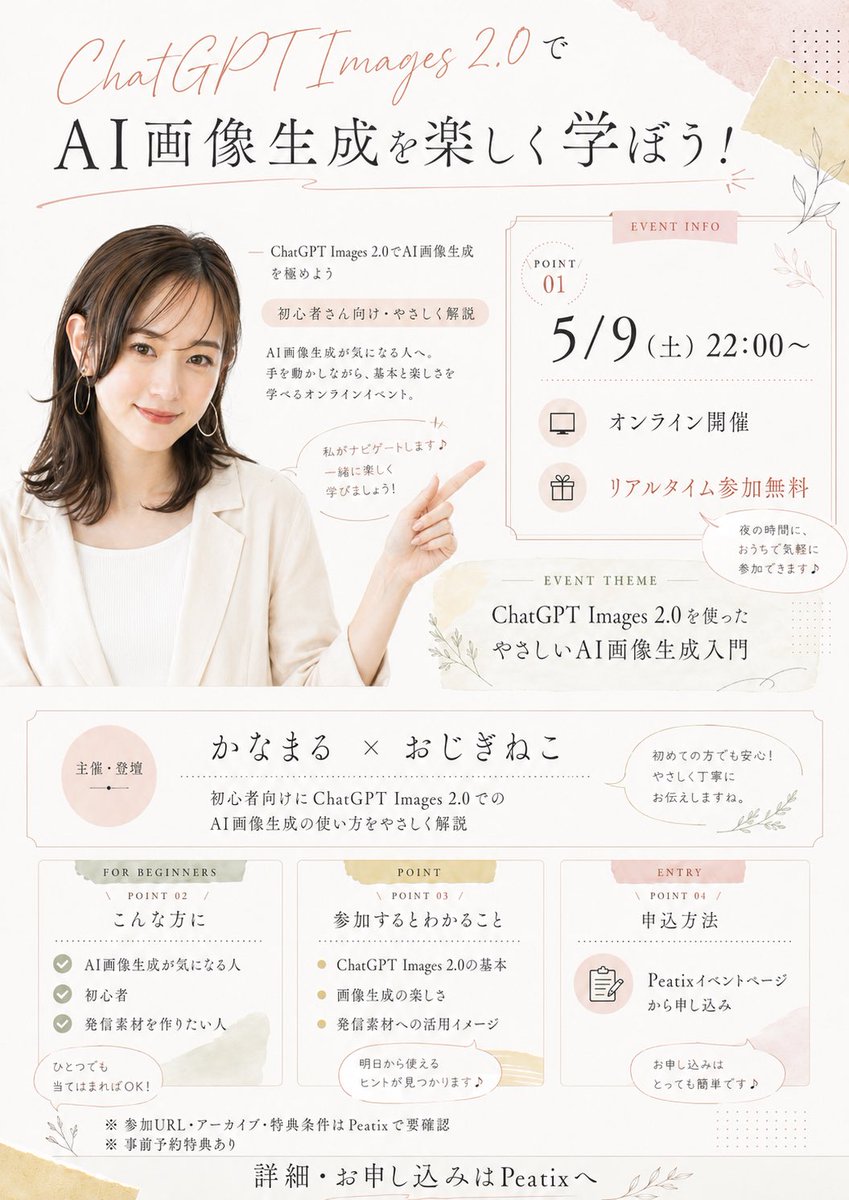
Case Notes
This page keeps the media, full prompt, and original source together so you can inspect the result first and decide whether the prompt is worth copying, saving, or comparing.
Case Insights
To make this page easier to search, cite, and reuse later, the case is also broken down into practical guidance about usage, visual cues, and prompt structure.
Best Fit Scenarios
- Use this as a portrait & photography benchmark when you need a fast style baseline before rewriting your own prompt.
- It is especially helpful if your target overlaps with Portrait, Poster, Watercolor and you want to judge the image result before tuning wording.
- Keep it as a control sample when you compare nearby prompt variants one variable at a time.
Visual Signals To Notice
- The clearest style signals here are Portrait, Poster, Watercolor, so those should usually stay in your first rewrite.
- Focus on framing, light direction, pose, and the distance between subject and camera.
- This case keeps one primary output, so the first image should be treated as the main visual reference.
How The Prompt Is Structured
- The prompt reads as a long, highly specified prompt, which is useful when you want to judge how much specificity this direction needs.
- Its keyword cluster is centered on Portrait, Poster, Watercolor, so you can usually keep that cluster while swapping subject, camera, layout, or copy details.
- A practical rewrite path is: keep the outcome, keep the strongest style cues, then replace only the subject and environment blocks.
Good Follow-up Questions
- What changes first if you keep Portrait, Poster, Watercolor but switch the subject matter?
- Which part of the result comes from section-level structure (Portrait & Photography) versus tag-level style cues?
- Which related cases in the same section give you a cleaner or more extreme variation of the same direction?
Full Prompt
Using REFERENCE_0 as the presenter photo, create a soft, elegant Japanese online seminar flyer in a warm beige/pink watercolor stationery style. Keep the presenter’s hair, outfit, earrings, and anonymized face block consistent, but crop her into the left side of the flyer and extend/generate her upper body so she is smiling toward the viewer with one arm raised and pointing to the event information on the right. Add delicate botanical line art, pale washi-tape textures, thin decorative borders, dotted accents, and pastel blush/gold highlights on an off-white background. Design the flyer as a vertical event announcement with these discrete content areas: 1 large top headline area, 1 right-side event info card, 1 event theme strip, 1 host/organizer strip, and 3 bottom information cards. Visible text to include: Top headline: “ChatGPT Images 2.0で” and large main title “AI画像生成を楽しく学ぼう!” Near the presenter: “ChatGPT Images 2.0でAI画像生成を極めよう”, “初心者さん向け・やさしく解説”, “AI画像生成が気になる人へ。手を動かしながら、基本と楽しさを学べるオンラインイベント。” and a speech bubble “私がナビゲートします♪ 一緒に楽しく学びましょう!” Right event info card labeled “EVENT INFO” with “POINT 01”, date/time “5/9(土)22:00〜”, “オンライン開催”, “リアルタイム参加無料”, plus a small speech bubble “夜の時間に、おうちで気軽に参加できます♪” Event theme strip labeled “EVENT THEME”: “ChatGPT Images 2.0を使った やさしいAI画像生成入門” Host strip: left circle “主催・登壇”, center “かなまる × おじぎねこ”, subtext “初心者向けにChatGPT Images 2.0での AI画像生成の使い方をやさしく解説”, right speech bubble “初めての方でも安心!やさしく丁寧にお伝えしますね。” Bottom 3 cards: Card 1 labeled “FOR BEGINNERS / POINT 02 / こんな方に” with 3 checklist items “AI画像生成が気になる人”, “初心者”, “発信素材を作りたい人” and bubble “ひとつでも当てはまればOK!”; Card 2 labeled “POINT / POINT 03 / 参加するとわかること” with 3 bullet items “ChatGPT Images 2.0の基本”, “画像生成の楽しさ”, “発信素材への活用イメージ” and bubble “明日から使えるヒントが見つかります♪”; Card 3 labeled “ENTRY / POINT 04 / 申込方法” with “Peatixイベントページから申し込み” and bubble “お申し込みはとっても簡単です♪” Footer notes: “※参加URL・アーカイブ・特典条件はPeatixで要確認”, “※事前予約特典あり”, and final call to action “詳細・お申し込みはPeatixへ”. Make the typography refined and airy, combining elegant Japanese Mincho-style serif text with a handwritten script for “ChatGPT Images 2.0”. Use {argument name="event date and time" default="5/9(土)22:00〜"}, {argument name="main headline" default="AI画像生成を楽しく学ぼう!"}, {argument name="presenter names" default="かなまる × おじぎねこ"}, {argument name="event platform" default="Peatix"}, and {argument name="theme text" default="ChatGPT Images 2.0を使った やさしいAI画像生成入門"}.