Case Media
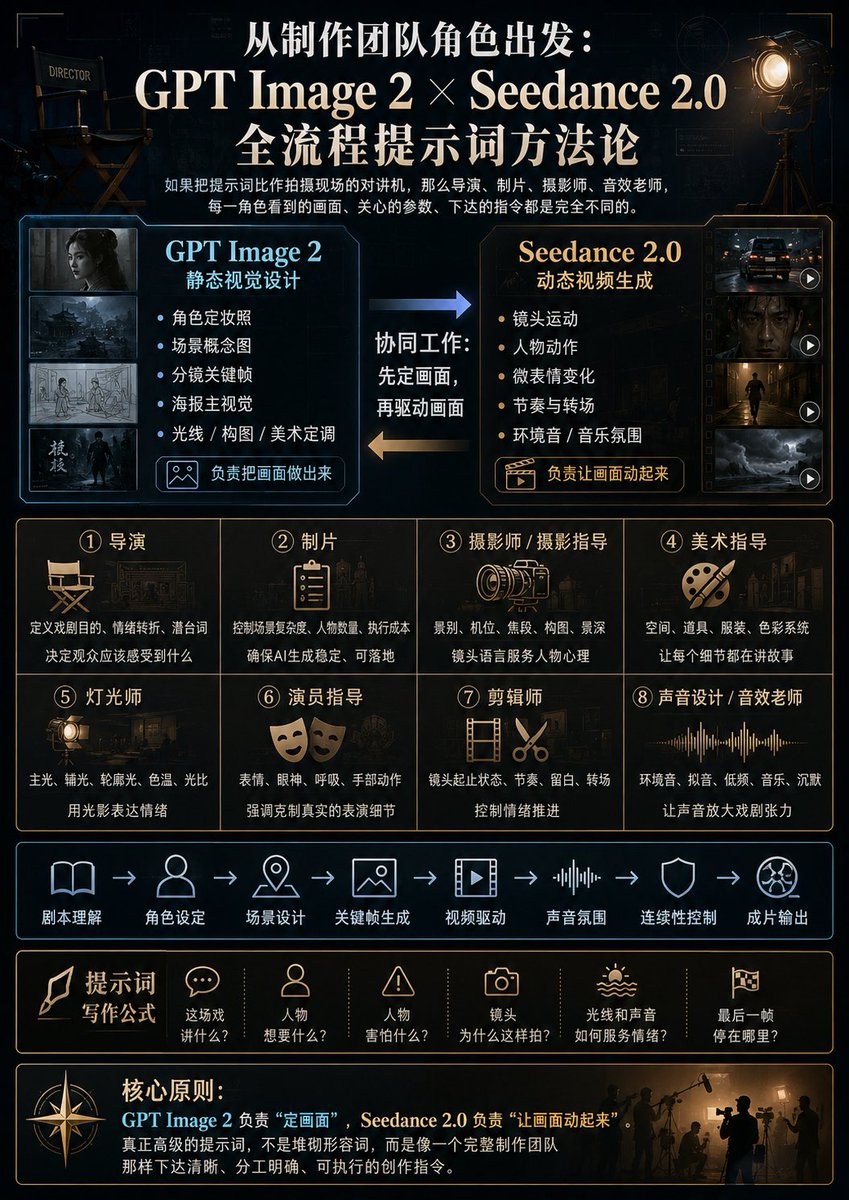
Case Notes
This page keeps the media, full prompt, and original source together so you can inspect the result first and decide whether the prompt is worth copying, saving, or comparing.
Case Insights
To make this page easier to search, cite, and reuse later, the case is also broken down into practical guidance about usage, visual cues, and prompt structure.
Best Fit Scenarios
- Use this as a model & community benchmark when you need a fast style baseline before rewriting your own prompt.
- It is especially helpful if your target overlaps with 35mm, Portrait, Cinematic and you want to judge the image result before tuning wording.
- Keep it as a control sample when you compare nearby prompt variants one variable at a time.
Visual Signals To Notice
- The clearest style signals here are 35mm, Portrait, Cinematic, so those should usually stay in your first rewrite.
- This kind of case is strongest when you watch deltas: what changed, what broke, and which prompt choice caused that shift.
- This case keeps one primary output, so the first image should be treated as the main visual reference.
How The Prompt Is Structured
- The prompt reads as a long, highly specified prompt, which is useful when you want to judge how much specificity this direction needs.
- Its keyword cluster is centered on 35mm, Portrait, Cinematic, so you can usually keep that cluster while swapping subject, camera, layout, or copy details.
- A practical rewrite path is: keep the outcome, keep the strongest style cues, then replace only the subject and environment blocks.
Good Follow-up Questions
- What changes first if you keep 35mm, Portrait, Cinematic but switch the subject matter?
- Which part of the result comes from section-level structure (Model & Community) versus tag-level style cues?
- Which related cases in the same section give you a cleaner or more extreme variation of the same direction?
Full Prompt
{"type":"cinematic Chinese infographic poster for an AI filmmaking prompt workflow","format":"vertical 3:4 poster","overall_style":"dark premium film-production control-room aesthetic, black and deep navy background, subtle blueprint grids and technical HUD lines, warm gold and cool cyan accents, high contrast, polished editorial layout, realistic cinematic props mixed with clean vector icons, elegant Chinese typography","headline":{"position":"top center","text":"{argument name=\"main headline\" default=\"从制作团队角色出发:\\nGPT Image 2 × Seedance 2.0\\n全流程提示词方法论\"}","style":"large bold white serif Chinese title with gold emphasis, centered"},"subtitle":{"position":"under headline","text":"如果把提示词比作拍摄现场的对讲机,那么导演、制片、摄影师、音效老师,每一角色看到的画面、关心的参数、下达的指令都是完全不同的。","style":"small white explanatory Chinese text"},"top_props":{"count":2,"items":[{"description":"director chair on the upper left, labeled DIRECTOR, dimly lit"},{"description":"large vintage film spotlight on tripod at upper right, glowing warm amber"}]},"main_comparison":{"position":"upper middle","count":2,"panels":[{"title":"GPT Image 2","subtitle":"静态视觉设计","position":"left","accent_color":"cyan blue","thumbnail_count":4,"thumbnails":["dark character portrait still","stormy cinematic city or battlefield environment","storyboard sketch frame","moody poster-like key visual with a standing figure"],"bullet_count":5,"bullets":["角色定妆照","场景概念图","分镜关键帧","海报主视觉","光线 / 构图 / 美术定调"],"button_label":"负责把画面做出来","button_icon":"image icon"},{"title":"Seedance 2.0","subtitle":"动态视频生成","position":"right","accent_color":"warm gold","thumbnail_count":4,"thumbnails":["night car chase or vehicle shot with play icon","dark close-up video still with play icon","figure walking through cinematic corridor with play icon","stormy landscape motion shot with play icon"],"bullet_count":5,"bullets":["镜头运动","人物动作","微表情变化","节奏与转场","环境音 / 音乐氛围"],"button_label":"负责让画面动起来","button_icon":"clapperboard play icon"}]},"workflow_arrows":{"position":"between comparison panels","count":2,"labels":["协同工作:先定画面,再驱动画面","left-to-right blue arrow","right-to-left gold arrow"]},"production_team_grid":{"position":"middle","count":8,"layout":"2 rows by 4 columns","cells":[{"number":"1","title":"导演","icon":"director chair","text":"定义戏剧目的、情绪转折、潜台词;决定观众应该感受到什么"},{"number":"2","title":"制片","icon":"clipboard","text":"控制场景复杂度、人物数量、执行成本;确保AI生成稳定、可落地"},{"number":"3","title":"摄影师 / 摄影指导","icon":"cinema camera lens","text":"景别、机位、焦段、构图、景深;镜头语言服务人物心理"},{"number":"4","title":"美术指导","icon":"paint palette and brush","text":"空间、道具、服装、色彩系统;让每个细节都在讲故事"},{"number":"5","title":"灯光师","icon":"studio light","text":"主光、辅光、轮廓光、色温、光比;用光影表达情绪"},{"number":"6","title":"演员指导","icon":"theater masks","text":"表情、眼神、呼吸、手部动作;强调克制真实的表演细节"},{"number":"7","title":"剪辑师","icon":"film strip and scissors","text":"镜头起止状态、节奏、留白、转场;控制情绪推进"},{"number":"8","title":"声音设计 / 音效老师","icon":"audio waveform","text":"环境音、拟音、低频、音乐、沉默;让声音放大戏剧张力"}]},"pipeline_strip":{"position":"lower middle","count":8,"style":"cyan line icons connected by arrows","steps":["剧本理解","角色设定","场景设计","关键帧生成","视频驱动","声音氛围","连续性控制","成片输出"]},"prompt_formula_bar":{"position":"below pipeline","title":"提示词写作公式","count":6,"items":[{"icon":"speech bubble","label":"这场戏讲什么?"},{"icon":"person","label":"人物想要什么?"},{"icon":"warning triangle","label":"人物害怕什么?"},{"icon":"camera","label":"为什么这样拍?"},{"icon":"sun and sound waves","label":"光线和声音如何服务情绪?"},{"icon":"film flag","label":"最后一帧停在哪里?"}]},"core_principle_footer":{"position":"bottom","title":"核心原则:","text":"{argument name=\"core principle text\" default=\"GPT Image 2 负责“定画面”,Seedance 2.0 负责“让画面动起来”\\n真正高级的提示词,不是堆砌形容词,而是像一个完整制作团队那样下达清晰、分工明确、可执行的创作指令。\"}","decorations":"large compass icon on the left, silhouettes of a film crew and boom operator on the right, warm backlight"},"color_palette":{"background":"near-black navy","primary_text":"ivory white","accent_1":"cyan blue","accent_2":"gold amber","lines":"thin gold and cyan borders"},"composition_notes":"Use many precise rectangular modules with thin glowing borders, balanced spacing, cinematic poster hierarchy, legible Chinese text, premium tutorial infographic for creators, no clutter outside the designed panels.","customization":{"topic":"{argument name=\"topic\" default=\"AI cinematic prompt methodology\"}","left tool name":"{argument name=\"left tool name\" default=\"GPT Image 2\"}","right tool name":"{argument name=\"right tool name\" default=\"Seedance 2.0\"}"}}