Case Media
Case Notes
This page keeps the media, full prompt, and original source together so you can inspect the result first and decide whether the prompt is worth copying, saving, or comparing.
Case Insights
To make this page easier to search, cite, and reuse later, the case is also broken down into practical guidance about usage, visual cues, and prompt structure.
Best Fit Scenarios
- Use this as a character design benchmark when you need a fast style baseline before rewriting your own prompt.
- It is especially helpful if your target overlaps with Character, Typography, Infographic and you want to judge the image result before tuning wording.
- Keep it as a control sample when you compare nearby prompt variants one variable at a time.
Visual Signals To Notice
- The clearest style signals here are Character, Typography, Infographic, so those should usually stay in your first rewrite.
- Look at silhouette, costume language, mood styling, and whether the character reads clearly at a glance.
- This case keeps one primary output, so the first image should be treated as the main visual reference.
How The Prompt Is Structured
- The prompt reads as a long, highly specified prompt, which is useful when you want to judge how much specificity this direction needs.
- Its keyword cluster is centered on Character, Typography, Infographic, so you can usually keep that cluster while swapping subject, camera, layout, or copy details.
- A practical rewrite path is: keep the outcome, keep the strongest style cues, then replace only the subject and environment blocks.
Good Follow-up Questions
- What changes first if you keep Character, Typography, Infographic but switch the subject matter?
- Which part of the result comes from section-level structure (Character Design) versus tag-level style cues?
- Which related cases in the same section give you a cleaner or more extreme variation of the same direction?
Full Prompt
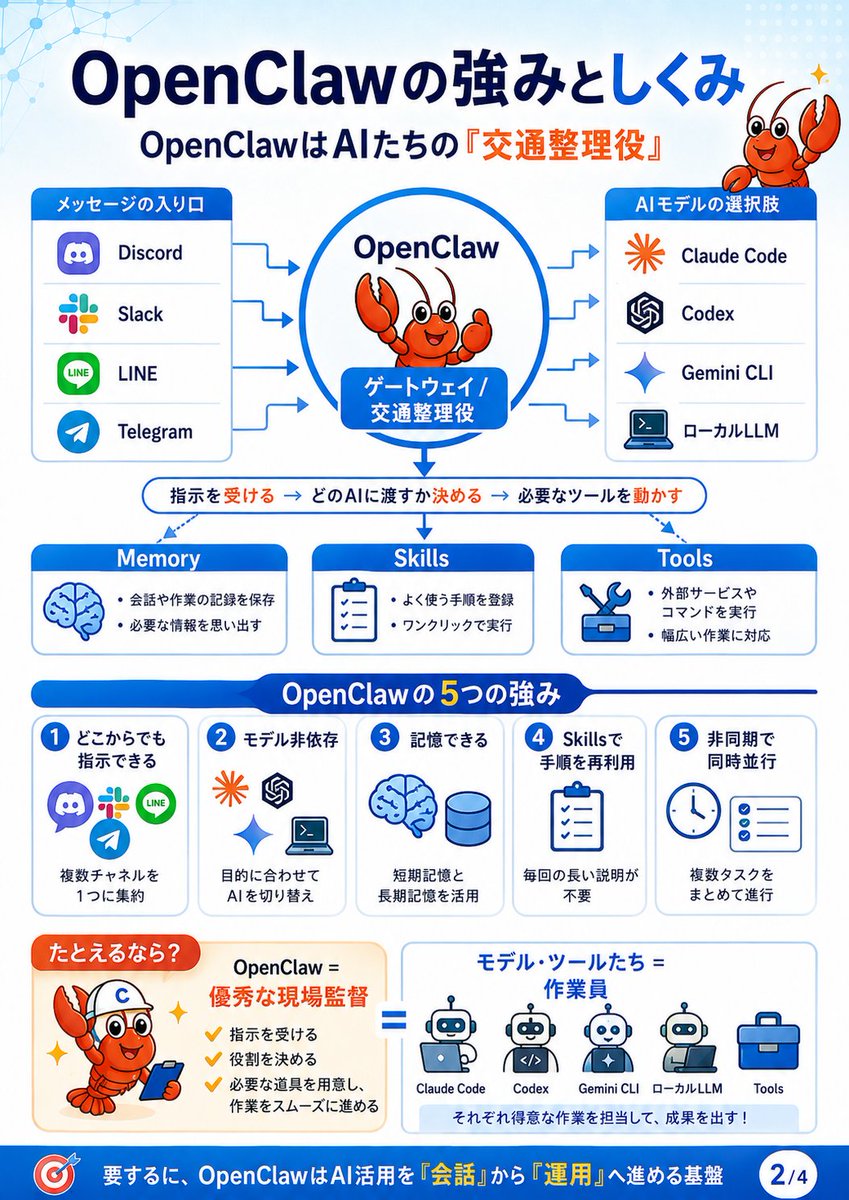
{"type":"Japanese educational infographic slide","theme":"OpenClaw system explanation, blue and white corporate tech style","canvas":"vertical 4:5 slide, clean vector graphics, rounded cards, light blue gradient background with subtle network node pattern in top left and dotted pattern in top right","language":"Japanese text throughout, with some English product names","headline":"{argument name=\"headline text\" default=\"OpenClawの強みとしくみ\"}","subheadline":"{argument name=\"subheadline text\" default=\"OpenClawはAIたちの『交通整理役』\"}","mascot":{"character":"{argument name=\"mascot character\" default=\"cute orange cartoon lobster mascot\"}","style":"friendly vector mascot with big eyes, smiling face, raised claw, small sparkle accents","placements":["top right beside headline","inside central OpenClaw circle","bottom left example box wearing a white helmet with a blue C and holding a smartphone"]},"layout":{"top_flow_diagram":{"position":"upper half","centerpiece":"large blue-outlined circle labeled OpenClaw with the lobster mascot inside and a blue rounded label reading ゲートウェイ / 交通整理役","left_input_panel":{"title":"メッセージの入り口","count":4,"items":["Discord","Slack","LINE","Telegram"],"icons":"recognizable app-style icons in a vertical rounded white card with blue header"},"right_output_panel":{"title":"AIモデルの選択肢","count":4,"items":["Claude Code","Codex","Gemini CLI","ローカルLLM"],"icons":"orange starburst, OpenAI knot, blue Gemini sparkle, laptop terminal icon in a vertical rounded white card with blue header"},"arrows":"blue arrows from the four message inputs into OpenClaw and from OpenClaw to the four AI model choices"},"process_bar":{"position":"middle under flow diagram","text":"指示を受ける → どのAIに渡すか決める → 必要なツールを動かす","style":"thin rounded white bar with blue outline, key verbs highlighted in orange, central downward blue arrow from OpenClaw"},"capability_cards":{"position":"middle row","count":3,"cards":[{"title":"Memory","icon":"blue brain","bullets":["会話や作業の記録を保存","必要な情報を思い出す"]},{"title":"Skills","icon":"clipboard checklist","bullets":["よく使う手順を登録","ワンクリックで実行"]},{"title":"Tools","icon":"wrench and tool box","bullets":["外部サービスやコマンドを実行","幅広い作業に対応"]}]},"strengths_section":{"position":"lower middle","title":"OpenClawの5つの強み","count":5,"cards":[{"number":"1","heading":"どこからでも指示できる","icons":["Discord","Slack","LINE","Telegram"],"body":"複数チャネルを1つに集約"},{"number":"2","heading":"モデル非依存","icons":["Claude Code","Codex","Gemini CLI","local terminal"],"body":"目的に合わせてAIを切り替え"},{"number":"3","heading":"記憶できる","icons":["brain","database cylinder"],"body":"短期記憶と長期記憶を活用"},{"number":"4","heading":"Skillsで手順を再利用","icons":["clipboard checklist"],"body":"毎回の長い説明が不要"},{"number":"5","heading":"非同期で同時並行","icons":["clock","checklist"],"body":"複数タスクをまとめて進行"}]},"analogy_section":{"position":"bottom above footer","count":2,"left_box":{"title":"たとえるなら?","content":"OpenClaw = 優秀な現場監督","bullets":["指示を受ける","役割を決める","必要な道具を用意し、作業をスムーズに進める"],"visual":"lobster mascot as construction supervisor with helmet and phone, orange accents, sparkle marks"},"right_box":{"title":"モデル・ツールたち = 作業員","content":"row of 5 worker/tool icons labeled Claude Code, Codex, Gemini CLI, ローカルLLM, Tools","footer_text":"それぞれ得意な作業を担当して、成果を出す!","connector":"large blue equals sign between the two boxes"}},"footer":{"position":"bottom blue bar","left_icon":"target icon","text":"{argument name=\"footer summary\" default=\"要するに、OpenClawはAI活用を『会話』から『運用』へ進める基盤\"}","page_badge":"2/4"}},"style":{"palette":"white, navy blue, bright blue, orange highlights","typography":"bold rounded Japanese sans-serif, large headline, readable infographic labels","rendering":"flat vector, crisp icons, high information density, presentation slide quality, no photorealism","composition":"symmetrical and structured, top-to-bottom explanation flow with clear arrows and section dividers"}}