案例媒体
案例说明
这个页面把案例媒体、完整 Prompt 和出处放在一起,方便你先看结果,再判断这条 Prompt 是否值得复制、收藏或加入对比。
案例解读
为了方便搜索、引用和后续复用,这里会把案例的适用场景、画面重点和 Prompt 结构拆成更容易浏览的说明。
这类案例适合用在什么场景
- 把它当作 UI 与社交媒体截图 的基准案例最合适,先看成片方向,再决定自己的 Prompt 要往哪边改。
- 如果你的目标也落在 霓虹、电影感、海报 这些方向,这条案例特别适合先看图判断风格,再回头微调描述。
- 做 Prompt 对比时,也很适合作为控制组,只改一个变量去看结果变化。
画面重点与风格信号
- 这条案例最明显的风格信号集中在 霓虹、电影感、海报,所以第一次改写时最好先保留这些关键词。
- 这类案例更值得先看界面密度、卡片层级,以及屏幕内容有没有先于文字讲清故事。
- 当前只有一张主图,所以第一张结果图就是最核心的参考基准。
Prompt 结构可以怎么理解
- 这条 Prompt 整体属于一条比较长、约束条件很多的 Prompt,很适合拿来判断这类方向到底需要写到多细。
- 关键词簇主要围绕 霓虹、电影感、海报 展开,所以复用时可以先保留这组风格词,再替换主体、镜头、环境或文案信息。
- 最稳的改写方式通常是先保留结果方向和最强风格信号,只替换主体设定与场景块。
如果你是带着问题来的,可以先看这些角度
- 如果保留 霓虹、电影感、海报,只换主体题材,结果最先变化的会是哪一部分?
- 这条结果里,哪些特征更像是 UI 与社交媒体截图 的结构特征,哪些又是标签风格本身带来的?
- 同分类的相关案例里,哪几条能给你更克制或更极致的相邻变体?
完整 Prompt
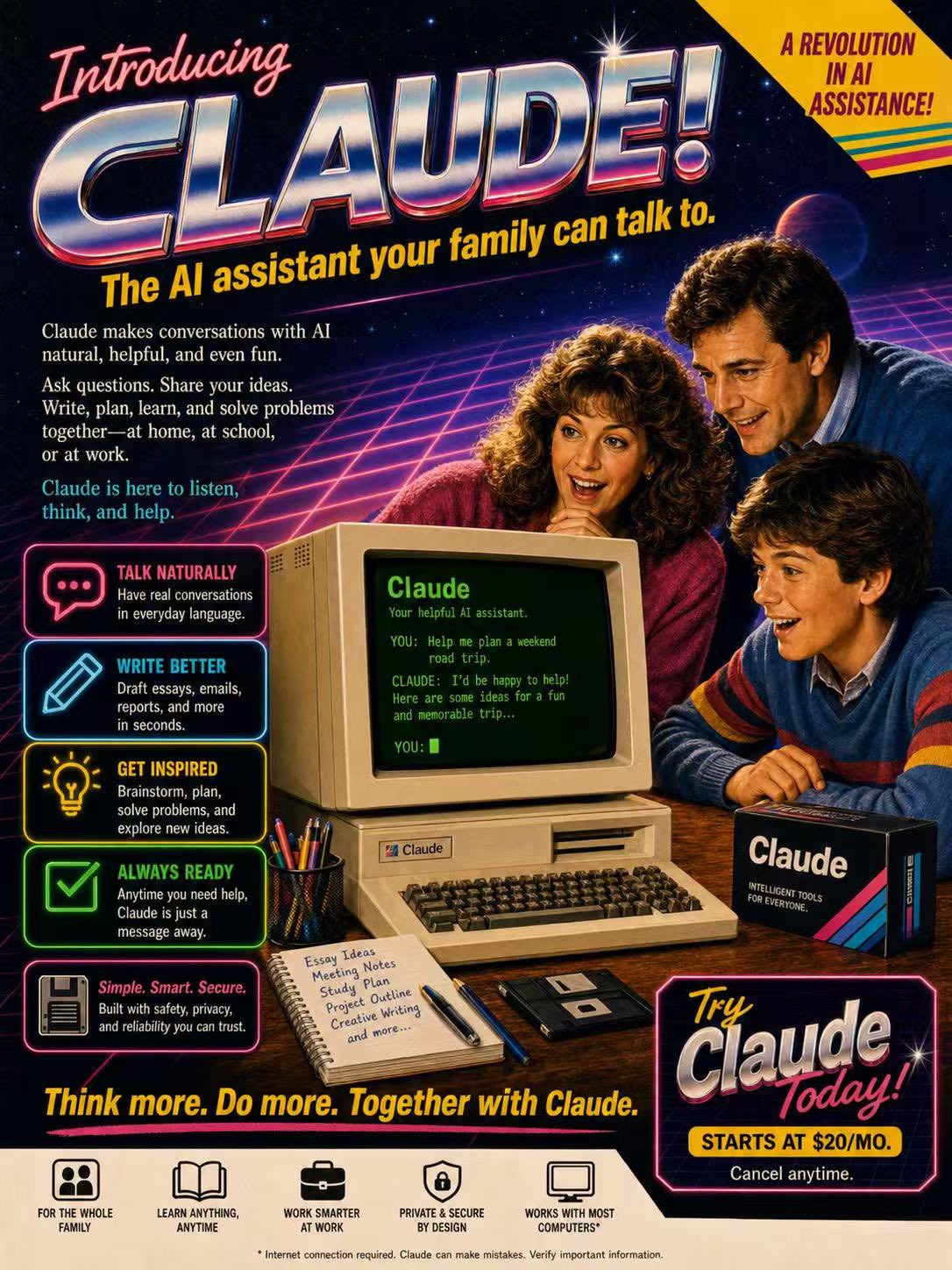
A fictional 1980s magazine advertisement poster introducing “Claude” as a revolutionary home AI assistant, retro commercial print ad style, bold headline at the top reading “Introducing Claude!”, large chrome metallic 3D typography with pink and blue reflections, yellow italic tagline underneath: “The AI assistant that talks back.” Center composition: a beige 1980s CRT home computer with chunky keyboard on a wooden desk, green monochrome terminal screen glowing, readable text on screen: “Claude”, subtitle: “The helpful AI assistant.” On the screen, a retro terminal-style conversation reads: “YOU: How can you help me today?” “CLAUDE: I can answer questions, help you write, summarize information, brainstorm ideas, and explain topics clearly.” “YOU:” A cheerful 1980s family of three gathers around the computer: father in a blue sweater, mother with curly hair in a pink sweater, young boy in a striped sweater, all looking amazed, delighted, and fascinated, warm nostalgic expressions, classic family technology advertising mood. Background: dark starry night sky, purple and blue neon perspective grid, retro sci-fi glow, subtle palm silhouettes, sparkling highlights, lens flares, dramatic yet friendly atmosphere. Poster layout: left side contains stacked retro feature boxes with glowing neon icons, including a question mark, pencil, light bulb, and clock. Each feature box includes short retro advertising copy: “ANSWERS QUESTIONS” — Get helpful, clear answers in everyday language. “HELPS YOU WRITE” — Draft ideas, notes, letters, and more with ease. “GENERATES IDEAS” — Brainstorm, create, and think bigger. “AVAILABLE WHENEVER YOU NEED IT” — Day or night, Claude is ready to help. Add a small retro text block describing Claude: “For the first time, an AI assistant you can have a conversation with. Ask questions. Get answers. Share ideas. Write drafts, notes, and reports. Explore topics, organize thoughts, and solve problems. Claude understands natural language and responds in a clear, helpful way.” Add a short highlighted copy block: “It’s helpful. It’s thoughtful. It’s always by your side.” Bottom area includes a large “Claude” brand wordmark with colorful diagonal retro stripes, and the slogan: “A smarter way to think, write, and explore.” Bottom right has a white promotional price sticker area with bold pink text: “Free!!” Smaller text underneath: “Available now for curious minds everywhere.” Top right has a bright yellow starburst badge saying: “A REVOLUTION IN AI ASSISTANCE!” Include a retro product box on the desk labeled “Claude” with small text: “SMARTER SOFTWARE FOR MODERN THINKERS.” Include a mug or accessory on the desk branded “Claude”. Visual style: 1985 consumer computer advertisement, airbrushed illustration, glossy print texture, halftone details, nostalgic retro futurism, high saturation, cinematic product lighting, authentic 1980s typography and layout, readable ad composition, detailed vintage commercial poster, highly polished, warm family-friendly mood, retro tech fantasy, vertical poster. Negative prompts: modern laptop, smartphone, flat design, minimalism, futuristic 2020s interface, cyberpunk overload, messy layout, unreadable typography, distorted text, misspelled words, deformed hands, extra fingers, bad anatomy, duplicate people, plastic skin, overexposed lighting, low resolution, blurry image, warped computer, broken keyboard, cluttered composition, inconsistent vintage style, random symbols, ugly poster design, poor hierarchy, incorrect perspective