案例媒体
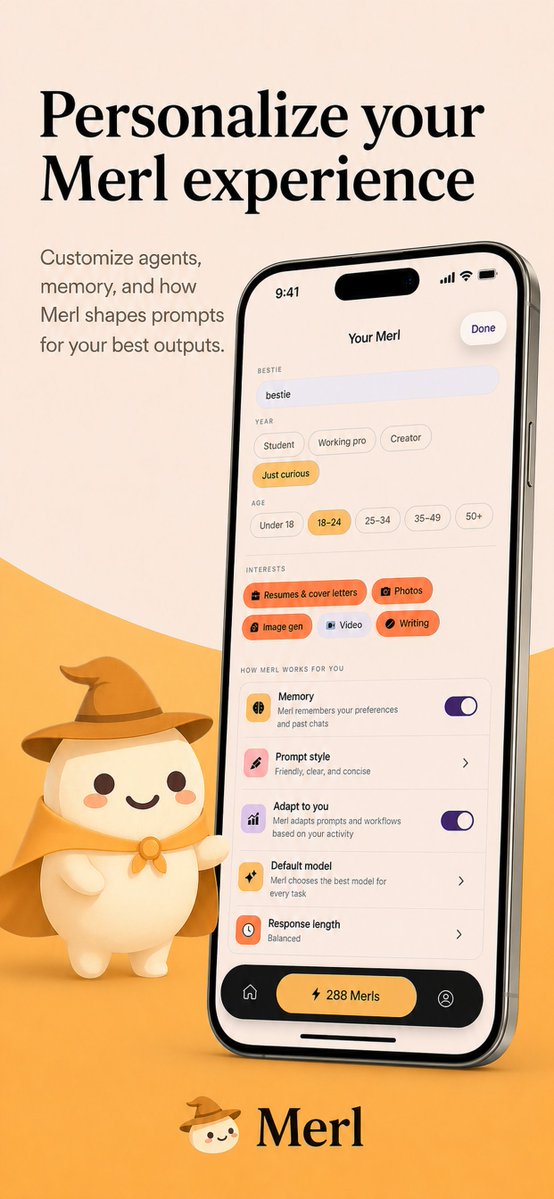
案例说明
这个页面把案例媒体、完整 Prompt 和出处放在一起,方便你先看结果,再判断这条 Prompt 是否值得复制、收藏或加入对比。
案例解读
为了方便搜索、引用和后续复用,这里会把案例的适用场景、画面重点和 Prompt 结构拆成更容易浏览的说明。
这类案例适合用在什么场景
- 把它当作 UI 与社交媒体截图 的基准案例最合适,先看成片方向,再决定自己的 Prompt 要往哪边改。
- 如果你的目标也落在 插画、UI、截图 这些方向,这条案例特别适合先看图判断风格,再回头微调描述。
- 做 Prompt 对比时,也很适合作为控制组,只改一个变量去看结果变化。
画面重点与风格信号
- 这条案例最明显的风格信号集中在 插画、UI、截图,所以第一次改写时最好先保留这些关键词。
- 这类案例更值得先看界面密度、卡片层级,以及屏幕内容有没有先于文字讲清故事。
- 当前只有一张主图,所以第一张结果图就是最核心的参考基准。
Prompt 结构可以怎么理解
- 这条 Prompt 整体属于一条比较长、约束条件很多的 Prompt,很适合拿来判断这类方向到底需要写到多细。
- 关键词簇主要围绕 插画、UI、截图 展开,所以复用时可以先保留这组风格词,再替换主体、镜头、环境或文案信息。
- 最稳的改写方式通常是先保留结果方向和最强风格信号,只替换主体设定与场景块。
如果你是带着问题来的,可以先看这些角度
- 如果保留 插画、UI、截图,只换主体题材,结果最先变化的会是哪一部分?
- 这条结果里,哪些特征更像是 UI 与社交媒体截图 的结构特征,哪些又是标签风格本身带来的?
- 同分类的相关案例里,哪几条能给你更克制或更极致的相邻变体?
完整 Prompt
{"type":"app store promotional screenshot","platform":"iOS","style":"clean premium branding, soft 3D mascot illustration, warm minimalist product marketing","brand":{"name":"{argument name=\"app name\" default=\"Merl\"}","primary colors":["warm cream","golden yellow","black","soft orange","lavender accent"]},"canvas":{"aspect_ratio":"9:16 vertical","background":"light beige upper field with a large curved golden-yellow wave rising from the bottom"},"layout":{"sections":[{"title":"hero headline","position":"top-left","count":2,"labels":["Personalize your","Merl experience"]},{"title":"supporting copy","position":"upper-left below headline","count":4,"labels":["Customize agents,","memory, and how","Merl shapes prompts","for your best outputs."]},{"title":"phone mockup","position":"center-right","count":1,"labels":["iPhone displaying the app customization screen"]},{"title":"mascot","position":"bottom-left of phone","count":1,"labels":["small white mascot wearing wizard hat and cape, one arm pointing toward the phone"]},{"title":"brand signature","position":"bottom-center","count":2,"labels":["mascot face icon","Merl"]}]},"device":{"model":"modern iPhone Pro style with dynamic island","angle":"slight rightward perspective tilt","finish":"glossy black metal frame","screen":{"header":{"time":"9:41","center title":"Your Merl","right action":"Done"},"content_sections":[{"title":"BESTIE","count":1,"labels":["bestie"]},{"title":"YEAR","count":4,"labels":["Student","Working pro","Creator","Just curious"]},{"title":"AGE","count":5,"labels":["Under 18","18–24","25–34","35–49","50+"]},{"title":"INTERESTS","count":5,"labels":["Resumes & cover letters","Photos","Image gen","Video","Writing"]},{"title":"HOW MERL WORKS FOR YOU","count":5,"labels":["Memory","Prompt style","Adapt to you","Default model","Response length"]},{"title":"bottom navigation","count":3,"labels":["home icon","center pill button: 288 Merls","profile icon"]}],"selected states":["Just curious","18–24","Resumes & cover letters","Photos","Image gen","Writing"],"toggles":{"count":2,"labels":["Memory on","Adapt to you on"]},"descriptive_rows":["Memory — Merl remembers your preferences and past chats","Prompt style — Friendly, clear, and concise","Adapt to you — Merl adapts prompts and workflows based on your activity","Default model — Merl chooses the best model for every task","Response length — Balanced"]}},"mascot":{"design":"rounded chibi-like white character with dot eyes, small smile, peach blush cheeks","outfit_count":3,"outfit_pieces":["brown wizard hat","golden cape","round neck clasp or bow"],"pose":"standing beside the phone, slightly waving or presenting it"},"typography":{"headline":"large elegant high-contrast serif in black","body":"small clean sans-serif in muted dark gray","logo":"serif wordmark matching the headline"},"lighting":"soft studio lighting with gentle shadows, polished app-advertisement finish","quality":"high-resolution, highly legible UI, consistent brand identity, premium iOS App Store screenshot aesthetic"}