案例媒体
案例说明
这个页面把案例媒体、完整 Prompt 和出处放在一起,方便你先看结果,再判断这条 Prompt 是否值得复制、收藏或加入对比。
案例解读
为了方便搜索、引用和后续复用,这里会把案例的适用场景、画面重点和 Prompt 结构拆成更容易浏览的说明。
这类案例适合用在什么场景
- 把它当作 模型对比与社区 的基准案例最合适,先看成片方向,再决定自己的 Prompt 要往哪边改。
- 如果你的目标也落在 海报、UI、截图 这些方向,这条案例特别适合先看图判断风格,再回头微调描述。
- 做 Prompt 对比时,也很适合作为控制组,只改一个变量去看结果变化。
画面重点与风格信号
- 这条案例最明显的风格信号集中在 海报、UI、截图,所以第一次改写时最好先保留这些关键词。
- 这类案例最有价值的地方通常是看差异:到底改了什么、哪里崩了、是哪段 Prompt 造成的变化。
- 当前只有一张主图,所以第一张结果图就是最核心的参考基准。
Prompt 结构可以怎么理解
- 这条 Prompt 整体属于一条比较长、约束条件很多的 Prompt,很适合拿来判断这类方向到底需要写到多细。
- 关键词簇主要围绕 海报、UI、截图 展开,所以复用时可以先保留这组风格词,再替换主体、镜头、环境或文案信息。
- 最稳的改写方式通常是先保留结果方向和最强风格信号,只替换主体设定与场景块。
如果你是带着问题来的,可以先看这些角度
- 如果保留 海报、UI、截图,只换主体题材,结果最先变化的会是哪一部分?
- 这条结果里,哪些特征更像是 模型对比与社区 的结构特征,哪些又是标签风格本身带来的?
- 同分类的相关案例里,哪几条能给你更克制或更极致的相邻变体?
完整 Prompt
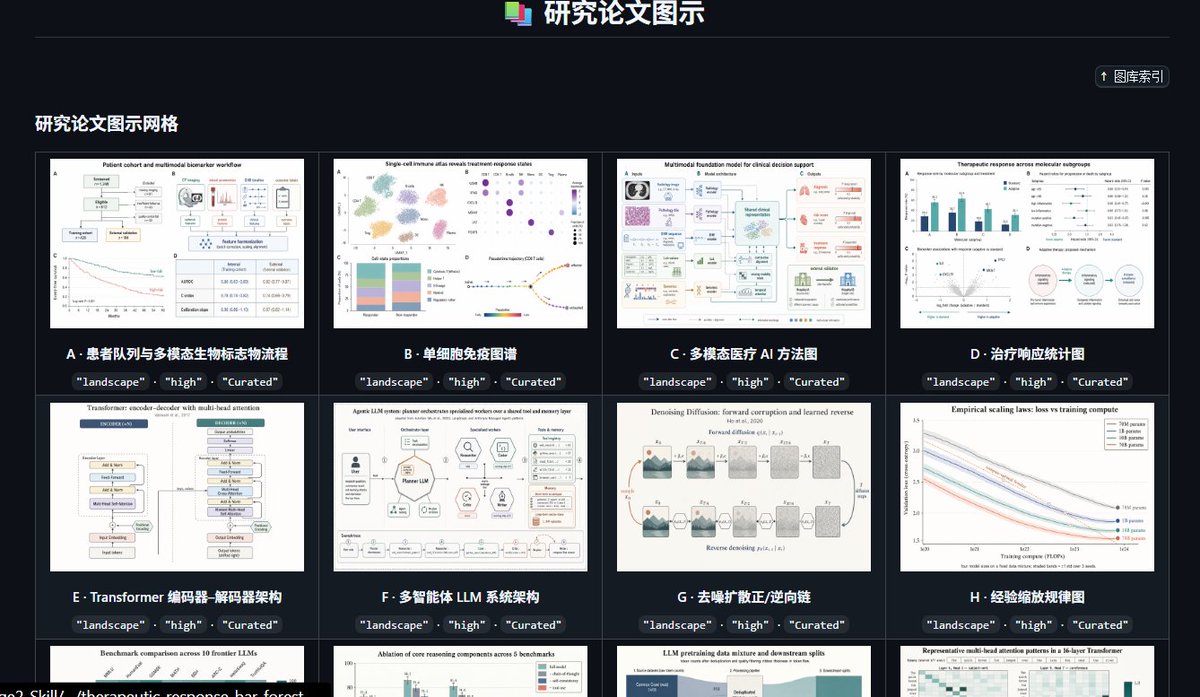
Goal: Create a dark, high-end gallery index page for a curated preset library of research paper figure styles, titled {argument name="headline text" default="研究论文图示"}. The interface should look like a polished web app screenshot showcasing academic diagram thumbnails. Canvas: Wide landscape browser-like composition, approximately 16:9, dark charcoal background, subtle grid borders, crisp UI typography, high contrast white and cyan text. Header: Center the title at the top with a small stacked multicolor document icon to its left. Add a thin horizontal divider line below the header. In the upper-right area, place a compact rounded button labeled “↑ 图库索引”. Section title: On the left below the divider, show the section heading {argument name="section title" default="研究论文图示网格"} in bold light text. Layout: Display a 4-column gallery grid with thin gray borders and dark card gutters. Show exactly 12 visible gallery cards: 8 full cards in the first two rows and 4 partially visible cards in the third row at the bottom edge. Each card contains a white research-paper-style thumbnail image, a bold lettered title underneath, and three small dark rounded tag pills below the title reading exactly “landscape”, “high”, and “Curated”. Visible card count and labels: Card A: “患者队列与多模态生物标志物流称流程”, thumbnail showing a patient cohort workflow with boxes, charts, and a survival curve. Card B: “单细胞免疫图谱”, thumbnail showing a single-cell immune atlas with UMAP clusters, dot plot, stacked bar chart, and trajectory plot. Card C: “多模态医疗 AI 方法图”, thumbnail showing a multimodal foundation model clinical decision support diagram with medical image, pathology, text, and model blocks. Card D: “治疗响应统计图”, thumbnail showing therapeutic response statistics with bar charts, forest plots, scatter plot, and a circular workflow. Card E: “Transformer 编码器-解码器架构”, thumbnail showing a transformer encoder-decoder architecture diagram with stacked module blocks. Card F: “多智能体 LLM 系统架构”, thumbnail showing an LLM multi-agent system architecture with central model block, surrounding tool icons, memory, reflection, and evaluation modules. Card G: “去噪扩散正/逆向链”, thumbnail showing a denoising diffusion forward and reverse process chain with noisy image panels and arrows. Card H: “经验缩放规律图”, thumbnail showing empirical scaling laws with multiple descending colored curves and a legend. Bottom partially visible card 1: title begins “Benchmark comparison across 10 frontier LLMs”, thumbnail with bar chart comparisons. Bottom partially visible card 2: title begins “Ablation of core reasoning components across 5 benchmarks”, thumbnail with grouped bars. Bottom partially visible card 3: title begins “LLM pretraining data mixture and downstream splits”, thumbnail with stacked area/data mixture blocks. Bottom partially visible card 4: title begins “Representative multi-head attention patterns in a 16-layer Transformer”, thumbnail with heatmaps. Visual style: Use a modern SaaS dashboard aesthetic, dark mode, neat academic curation feel, subtle cyan accents, small but legible labels, and realistic research figure thumbnails that resemble high-quality journal diagrams. Keep thumbnails varied but consistently white-background scientific figures. Constraints: Preserve the Chinese interface labels and card titles as written. Do not add people, photos, watermarks, browser address bars, or decorative clutter. The composition should feel like a screenshot of a curated research-figure template library named {argument name="project name" default="GPT-IMAGE-2-SKILL"}.