Case Media
Case Notes
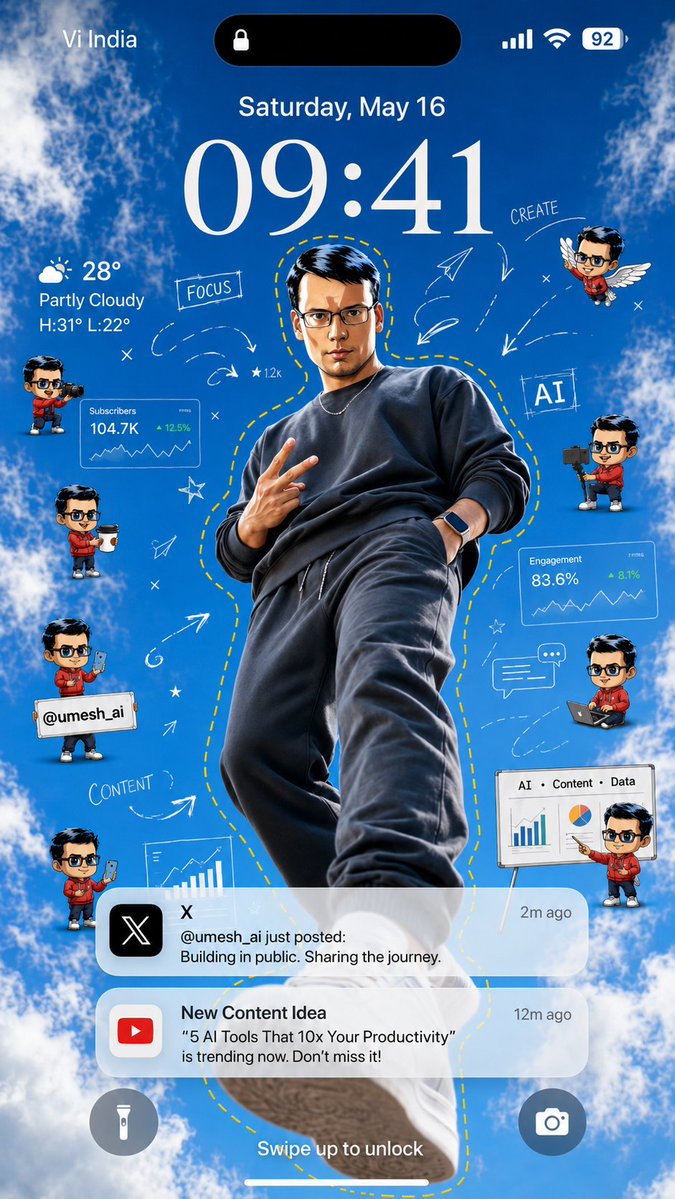
This page keeps the media, full prompt, and original source together so you can inspect the result first and decide whether the prompt is worth copying, saving, or comparing.
Case Insights
To make this page easier to search, cite, and reuse later, the case is also broken down into practical guidance about usage, visual cues, and prompt structure.
Best Fit Scenarios
- Use this as a ui & social screens benchmark when you need a fast style baseline before rewriting your own prompt.
- It is especially helpful if your target overlaps with Portrait, UI, Screenshot and you want to judge the image result before tuning wording.
- Keep it as a control sample when you compare nearby prompt variants one variable at a time.
Visual Signals To Notice
- The clearest style signals here are Portrait, UI, Screenshot, so those should usually stay in your first rewrite.
- The important layer is usually interface density, card hierarchy, and how the screen tells the story before you read small text.
- This case keeps one primary output, so the first image should be treated as the main visual reference.
How The Prompt Is Structured
- The prompt reads as a long, highly specified prompt, which is useful when you want to judge how much specificity this direction needs.
- Its keyword cluster is centered on Portrait, UI, Screenshot, so you can usually keep that cluster while swapping subject, camera, layout, or copy details.
- A practical rewrite path is: keep the outcome, keep the strongest style cues, then replace only the subject and environment blocks.
Good Follow-up Questions
- What changes first if you keep Portrait, UI, Screenshot but switch the subject matter?
- Which part of the result comes from section-level structure (UI & Social Screens) versus tag-level style cues?
- Which related cases in the same section give you a cleaner or more extreme variation of the same direction?
Full Prompt
Goal: Create a vertical smartphone lock-screen wallpaper themed around a creator/AI productivity influencer, with an iPhone-style interface over a bright blue sky and clouds background. Canvas: 9:16 vertical mobile wallpaper, realistic high-resolution composite, designed to look like a phone lock screen screenshot. Use a vivid daytime sky background with fluffy white clouds around the edges and a clear blue center. Main subject: Place one full-body young male creator in the center, shot from a dramatic low angle as if standing above the viewer. He wears a dark charcoal sweatshirt, dark joggers, sneakers, a thin chain necklace, and a smartwatch. His pose is confident, one hand making a peace sign and the other in his pocket. Add a hand-drawn yellow dashed outline following his body silhouette. Use {argument name="creator handle" default="@umesh_ai"} as the social handle shown in the design. Keep the face anonymized or softly blurred if needed. Lock-screen UI: At the top, show carrier text “Vi India” on the left, a black Dynamic Island pill with a small lock icon in the center, and signal, Wi‑Fi, and battery “92” on the right. Below it, show the date “Saturday, May 16” and a very large elegant serif time reading {argument name="lock screen time" default="09:41"}. On the left under the time, show weather: a partly cloudy icon, “28°”, “Partly Cloudy”, and “H:31° L:22°”. At the bottom, show two circular lock-screen buttons: flashlight on the left and camera on the right, plus the text “Swipe up to unlock” above the home indicator. Floating creator elements: Include exactly 8 small chibi-style mini avatars of the same creator around the main figure, all with matching red hoodie and dark hair, faces anonymized if needed. Count and positions: 1 left upper holding a video camera, 1 left middle holding a takeaway coffee cup, 1 left lower holding a sign with “@umesh_ai”, 1 left bottom holding a smartphone, 1 right upper flying with white wings, 1 right middle holding a camera rig, 1 right lower sitting with a laptop, and 1 far right bottom presenting beside a whiteboard. Analytics and creator graphics: Add exactly 4 data/creator panels: 1 translucent card labeled “Subscribers” with “104.7K” and “+12.5%”, 1 translucent card labeled “Engagement” with “83.6%” and “+8.1%”, 1 bottom-right whiteboard labeled “AI • Content • Data” with bar chart and pie chart, and 1 lower-left partial chart card showing a rising bar chart. Add hand-drawn white doodles around the subject: arrows, paper planes, stars, x marks, dashed motion trails, a chat bubble, and the handwritten words “FOCUS”, “CREATE”, “AI”, and “CONTENT”. Keep the doodles airy and sketch-like, not cluttered. Notifications: Include exactly 2 rounded translucent notification banners near the lower third. First notification: black X app icon, title “X”, time “2m ago”, and message “@umesh_ai just posted: Building in public. Sharing the journey.” Second notification: red YouTube icon, title “New Content Idea”, time “12m ago”, and message ““5 AI Tools That 10x Your Productivity” is trending now. Don’t miss it!” Use {argument name="content idea text" default="5 AI Tools That 10x Your Productivity"} for the quoted title. Visual style: Bright, polished, viral social-media wallpaper aesthetic; realistic central subject mixed with cute 3D chibi avatars, semi-transparent iOS glassmorphism panels, crisp typography, white doodle overlays, and high contrast against the blue sky. Make it energetic, motivational, and creator-economy themed. Avoid extra watermarks or unrelated text.