Case Media
Case Notes
This page keeps the media, full prompt, and original source together so you can inspect the result first and decide whether the prompt is worth copying, saving, or comparing.
Case Insights
To make this page easier to search, cite, and reuse later, the case is also broken down into practical guidance about usage, visual cues, and prompt structure.
Best Fit Scenarios
- Use this as a ui & social screens benchmark when you need a fast style baseline before rewriting your own prompt.
- It is especially helpful if your target overlaps with 35mm, Neon, Cinematic and you want to judge the image result before tuning wording.
- Keep it as a control sample when you compare nearby prompt variants one variable at a time.
Visual Signals To Notice
- The clearest style signals here are 35mm, Neon, Cinematic, so those should usually stay in your first rewrite.
- The important layer is usually interface density, card hierarchy, and how the screen tells the story before you read small text.
- This case keeps one primary output, so the first image should be treated as the main visual reference.
How The Prompt Is Structured
- The prompt reads as a long, highly specified prompt, which is useful when you want to judge how much specificity this direction needs.
- Its keyword cluster is centered on 35mm, Neon, Cinematic, so you can usually keep that cluster while swapping subject, camera, layout, or copy details.
- A practical rewrite path is: keep the outcome, keep the strongest style cues, then replace only the subject and environment blocks.
Good Follow-up Questions
- What changes first if you keep 35mm, Neon, Cinematic but switch the subject matter?
- Which part of the result comes from section-level structure (UI & Social Screens) versus tag-level style cues?
- Which related cases in the same section give you a cleaner or more extreme variation of the same direction?
Full Prompt
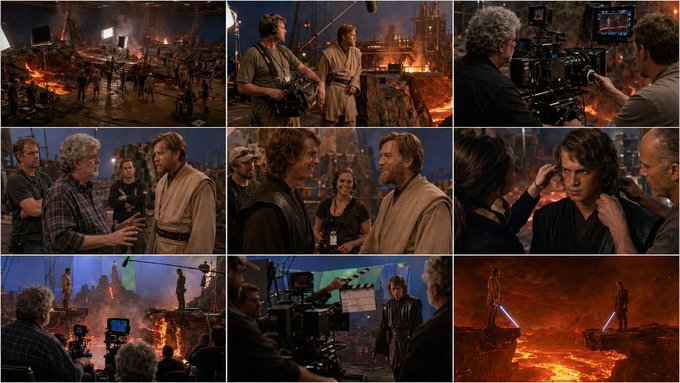
[ FILM SCENE / DIALOGUE INPUT ]: (buraya sahne veya diyalog yaz) A 3×3 cinematic storyboard grid that visualizes the entire filming process of the given movie scene — from behind-the-scenes preparation and human moments to the final, on-screen cinematic frame. ⚠️ IMPORTANT REALISM RULE The director appearing in behind-the-scenes frames must be the real-life director of the referenced film. The model must identify the correct director automatically based on the film scene or dialogue input. The user does not provide the director’s name. The first 8 frames depict the camera-behind reality: crew, preparation, coordination, tension, humor, and intimacy on set. The 9th frame is the actual movie frame, exactly as it appears in the final film — no crew, no equipment, pure cinema. Tone: authentic, cinematic, human, professional. Style: realistic, documentary-like behind the scenes → polished cinematic final shot. If the scene requires visual effects support, such as: green screen blue screen wire rigs harnesses suspension cables motion-control rigs these elements must be clearly visible in the appropriate behind-the-scenes frames 🎥 CAMERA & LENS (GLOBAL) Professional cinema camera Anamorphic lens language 2.39:1 cinematic framing inside each grid cell Behind-the-scenes frames feel observational Final frame feels composed and intentional No exaggerated stylization 💡 LIGHTING (GLOBAL) Practical, real film-set lighting Visible light sources in BTS frames: Softboxes Flags Reflectors Final frame: motivated cinematic lighting only Clear contrast between work light and story light 🧩 3×3 GRID – DETAILED FRAME BREAKDOWN FRAME 1 – Set Preparation (Wide / Behind the Camera) Wide shot of the film set before rolling Lighting equipment visible Light technician adjusting a key light Cables, stands, controlled chaos Actors not yet in position FRAME 2 – Sound Check (Medium / Technical Focus) Boom operator holding microphone just out of frame Sound technician wearing headphones Actor standing relaxed, waiting Casual atmosphere, low tension FRAME 3 – Camera Setup (Medium / Precision) Camera operator adjusting focus and lens Assistant pulling focus marks Monitor visible with framing guides The scene exists only on the screen-within-screen FRAME 4 – Director’s Instruction (Medium / Authority) The real director of the film speaking to the actor Director’s physical appearance, age, posture consistent with real-life identity Calm but focused body language Hands explaining blocking Crew listening quietly Scene energy starting to shift FRAME 5 – Actors Between Takes (Medium / Human Moment) Actors sharing a light joke Subtle smiles, relaxed posture One actor laughing mid-sentence Crew in the background smiling A brief release of tension FRAME 6 – Final Adjustments (Close / Concentration) Makeup artist fixing a detail Wardrobe adjustment Actor’s face transitioning from casual to serious Emotional switch visible FRAME 7 – Silence Before Action (Wide / Anticipation) Everyone in position The real director seated behind the monitor Camera locked, boom lifted Actors ready, no smiles now Heavy silence implied FRAME 8 – “Action” Moment (Medium / Transition) Camera rolling Slate claps Actor already in character Crew frozen, holding breath The moment just before cinema begins FRAME 9 – FINAL FILM FRAME (Wide / On-Screen Reality) No crew, no equipment Pure cinematic shot from the actual movie Perfectly composed frame Cinematic lighting and color grading Emotional core of the scene visible Looks like a real film still, suitable for a movie poster 🚫 NEGATIVE PROMPT (GLOBAL) anime, cartoon, illustration, fantasy, sci-fi, cyberpunk, neon lighting, modern UI overlays, subtitles, text, logos, exaggerated acting, staged behind-the-scenes posing, artificial smiles, glossy beauty lighting