Case Media
Case Notes
This page keeps the media, full prompt, and original source together so you can inspect the result first and decide whether the prompt is worth copying, saving, or comparing.
Case Insights
To make this page easier to search, cite, and reuse later, the case is also broken down into practical guidance about usage, visual cues, and prompt structure.
Best Fit Scenarios
- Use this as a ui & social screens benchmark when you need a fast style baseline before rewriting your own prompt.
- It is especially helpful if your target overlaps with Illustration, UI, Screenshot and you want to judge the image result before tuning wording.
- Keep it as a control sample when you compare nearby prompt variants one variable at a time.
Visual Signals To Notice
- The clearest style signals here are Illustration, UI, Screenshot, so those should usually stay in your first rewrite.
- The important layer is usually interface density, card hierarchy, and how the screen tells the story before you read small text.
- This case keeps one primary output, so the first image should be treated as the main visual reference.
How The Prompt Is Structured
- The prompt reads as a long, highly specified prompt, which is useful when you want to judge how much specificity this direction needs.
- Its keyword cluster is centered on Illustration, UI, Screenshot, so you can usually keep that cluster while swapping subject, camera, layout, or copy details.
- A practical rewrite path is: keep the outcome, keep the strongest style cues, then replace only the subject and environment blocks.
Good Follow-up Questions
- What changes first if you keep Illustration, UI, Screenshot but switch the subject matter?
- Which part of the result comes from section-level structure (UI & Social Screens) versus tag-level style cues?
- Which related cases in the same section give you a cleaner or more extreme variation of the same direction?
Full Prompt
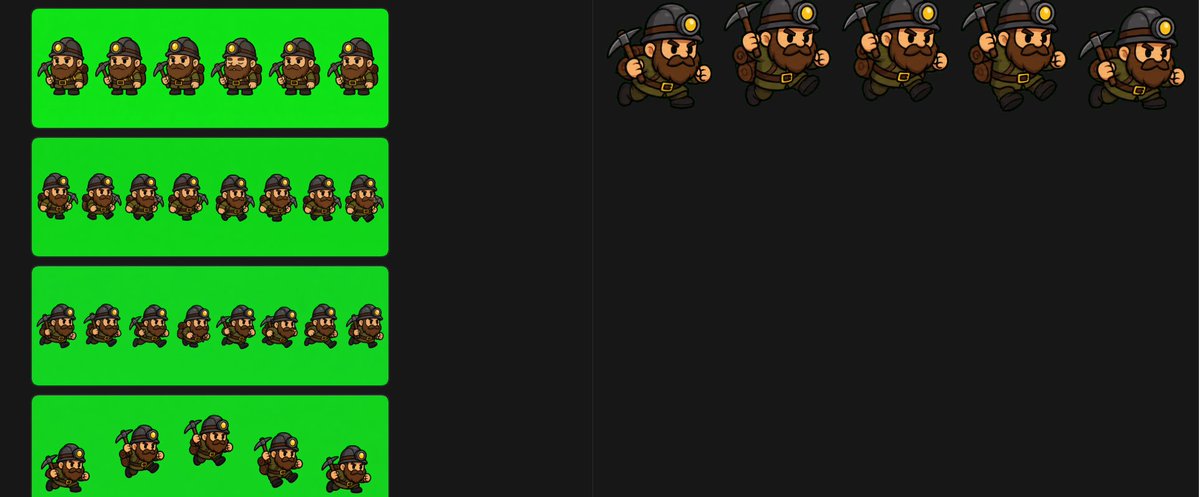
{"type":"2D game sprite sheet for a chibi miner character","style":"cartoon pixel-art-inspired digital illustration, thick dark outlines, cel shaded, compact proportions, game-ready animation frames, transparent-feeling dark workspace with bright chroma green export panels","character":{"role":"{argument name=\"character role\" default=\"dwarf miner\"}","body":"short stocky chibi build, oversized head, small legs and arms","face":"large nose, angry determined eyebrows, full dark brown beard and mustache","outfit":"dark miner helmet with glowing yellow headlamp, brown backpack, belt with gold buckle, dark boots, work gloves","tool":"{argument name=\"held tool\" default=\"pickaxe\"}","main colors":"{argument name=\"main color palette\" default=\"black helmet, brown clothing, dark brown beard, gold lamp and buckle\"}"},"canvas":{"aspect":"wide horizontal sprite-sheet canvas","background":"nearly black editor-like background with subtle vertical divider lines","left area":"four rounded rectangular bright green chroma-key panels stacked vertically","right area":"open black workspace with five larger isolated animation poses along the top"},"layout":{"sections":[{"title":"small back-facing walk cycle strip","position":"upper left green panel","count":6,"labels":["frame 1 back walk","frame 2 back walk","frame 3 back walk","frame 4 back walk","frame 5 back walk","frame 6 back walk"],"description":"six tiny rear-view frames of the miner walking, backpack centered, helmet lamp barely visible, pickaxe and arms shifting subtly"},{"title":"small turn / rear-to-front strip","position":"second left green panel","count":8,"labels":["frame 1 rear view","frame 2 rear view","frame 3 rear view","frame 4 rear view","frame 5 rear view","frame 6 rear view","frame 7 rear view","frame 8 front-facing idle"],"description":"eight tiny frames on green, mostly back views with the final frame turned to a front-facing miner"},{"title":"small mixed direction strip","position":"third left green panel","count":8,"labels":["frame 1 front-left miner","frame 2 back view","frame 3 back view","frame 4 front view","frame 5 back view","frame 6 front-left crouch","frame 7 back view","frame 8 back view"],"description":"eight tiny frames alternating between rear-facing backpack views and front/three-quarter miner views"},{"title":"small action strip","position":"bottom left green panel","count":5,"labels":["frame 1 crouched front-left","frame 2 rear with raised pickaxe","frame 3 running rear three-quarter","frame 4 rear running","frame 5 crouched side"],"description":"five tiny action poses, including crouching and running, with the pickaxe raised or trailing"},{"title":"large running poses","position":"top right on black background","count":5,"labels":["large frame 1 side run with pickaxe behind","large frame 2 side run holding pickaxe upright","large frame 3 side run holding pickaxe upright","large frame 4 side run holding pickaxe upright","large frame 5 side run with backpack and pickaxe behind"],"description":"five larger clean character sprites arranged horizontally, all facing right, showing a running cycle with swinging arms, stomping boots, backpack bounce, and pickaxe movement"}],"composition":"leave large empty black space below the top-right large sprites, keep sprite frames evenly spaced, preserve consistent scale within each strip, use crisp outlines and readable silhouettes for game animation extraction"},"rendering":"high contrast, no text labels visible in the image, no UI buttons, no watermark, clean sprite-sheet presentation, bright green panels suitable for chroma keying"}