Case Media
Case Notes
This page keeps the media, full prompt, and original source together so you can inspect the result first and decide whether the prompt is worth copying, saving, or comparing.
Case Insights
To make this page easier to search, cite, and reuse later, the case is also broken down into practical guidance about usage, visual cues, and prompt structure.
Best Fit Scenarios
- Use this as a ui & social screens benchmark when you need a fast style baseline before rewriting your own prompt.
- It is especially helpful if your target overlaps with Illustration, UI, Screenshot and you want to judge the image result before tuning wording.
- Keep it as a control sample when you compare nearby prompt variants one variable at a time.
Visual Signals To Notice
- The clearest style signals here are Illustration, UI, Screenshot, so those should usually stay in your first rewrite.
- The important layer is usually interface density, card hierarchy, and how the screen tells the story before you read small text.
- This case keeps one primary output, so the first image should be treated as the main visual reference.
How The Prompt Is Structured
- The prompt reads as a long, highly specified prompt, which is useful when you want to judge how much specificity this direction needs.
- Its keyword cluster is centered on Illustration, UI, Screenshot, so you can usually keep that cluster while swapping subject, camera, layout, or copy details.
- A practical rewrite path is: keep the outcome, keep the strongest style cues, then replace only the subject and environment blocks.
Good Follow-up Questions
- What changes first if you keep Illustration, UI, Screenshot but switch the subject matter?
- Which part of the result comes from section-level structure (UI & Social Screens) versus tag-level style cues?
- Which related cases in the same section give you a cleaner or more extreme variation of the same direction?
Full Prompt
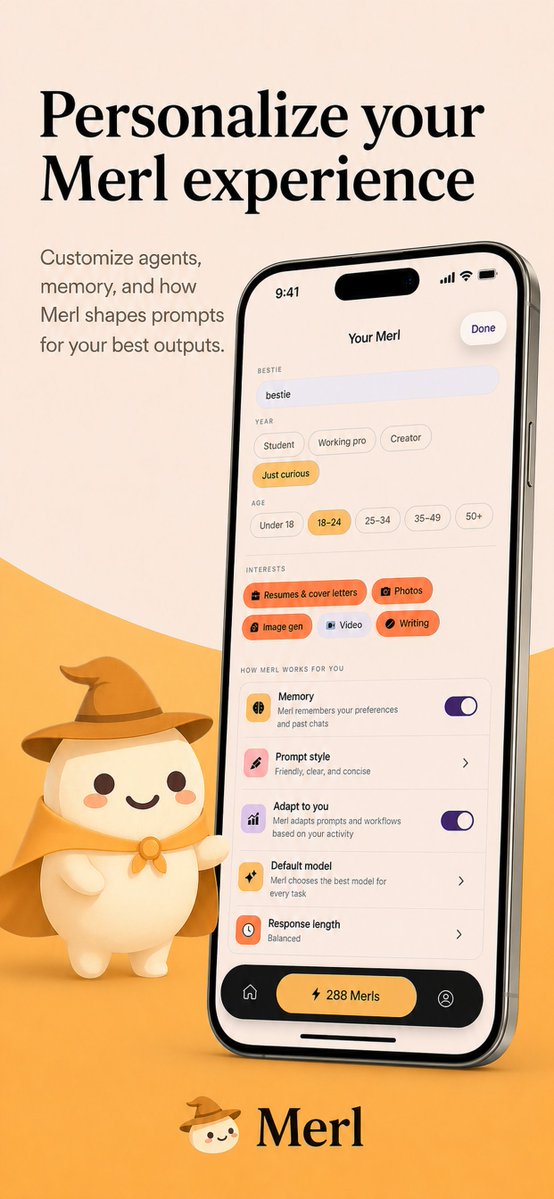
{"type":"app store promotional screenshot","platform":"iOS","style":"clean premium branding, soft 3D mascot illustration, warm minimalist product marketing","brand":{"name":"{argument name=\"app name\" default=\"Merl\"}","primary colors":["warm cream","golden yellow","black","soft orange","lavender accent"]},"canvas":{"aspect_ratio":"9:16 vertical","background":"light beige upper field with a large curved golden-yellow wave rising from the bottom"},"layout":{"sections":[{"title":"hero headline","position":"top-left","count":2,"labels":["Personalize your","Merl experience"]},{"title":"supporting copy","position":"upper-left below headline","count":4,"labels":["Customize agents,","memory, and how","Merl shapes prompts","for your best outputs."]},{"title":"phone mockup","position":"center-right","count":1,"labels":["iPhone displaying the app customization screen"]},{"title":"mascot","position":"bottom-left of phone","count":1,"labels":["small white mascot wearing wizard hat and cape, one arm pointing toward the phone"]},{"title":"brand signature","position":"bottom-center","count":2,"labels":["mascot face icon","Merl"]}]},"device":{"model":"modern iPhone Pro style with dynamic island","angle":"slight rightward perspective tilt","finish":"glossy black metal frame","screen":{"header":{"time":"9:41","center title":"Your Merl","right action":"Done"},"content_sections":[{"title":"BESTIE","count":1,"labels":["bestie"]},{"title":"YEAR","count":4,"labels":["Student","Working pro","Creator","Just curious"]},{"title":"AGE","count":5,"labels":["Under 18","18–24","25–34","35–49","50+"]},{"title":"INTERESTS","count":5,"labels":["Resumes & cover letters","Photos","Image gen","Video","Writing"]},{"title":"HOW MERL WORKS FOR YOU","count":5,"labels":["Memory","Prompt style","Adapt to you","Default model","Response length"]},{"title":"bottom navigation","count":3,"labels":["home icon","center pill button: 288 Merls","profile icon"]}],"selected states":["Just curious","18–24","Resumes & cover letters","Photos","Image gen","Writing"],"toggles":{"count":2,"labels":["Memory on","Adapt to you on"]},"descriptive_rows":["Memory — Merl remembers your preferences and past chats","Prompt style — Friendly, clear, and concise","Adapt to you — Merl adapts prompts and workflows based on your activity","Default model — Merl chooses the best model for every task","Response length — Balanced"]}},"mascot":{"design":"rounded chibi-like white character with dot eyes, small smile, peach blush cheeks","outfit_count":3,"outfit_pieces":["brown wizard hat","golden cape","round neck clasp or bow"],"pose":"standing beside the phone, slightly waving or presenting it"},"typography":{"headline":"large elegant high-contrast serif in black","body":"small clean sans-serif in muted dark gray","logo":"serif wordmark matching the headline"},"lighting":"soft studio lighting with gentle shadows, polished app-advertisement finish","quality":"high-resolution, highly legible UI, consistent brand identity, premium iOS App Store screenshot aesthetic"}