Case Media
Case Notes
This page keeps the media, full prompt, and original source together so you can inspect the result first and decide whether the prompt is worth copying, saving, or comparing.
Case Insights
To make this page easier to search, cite, and reuse later, the case is also broken down into practical guidance about usage, visual cues, and prompt structure.
Best Fit Scenarios
- Use this as a ui & social screens benchmark when you need a fast style baseline before rewriting your own prompt.
- It is especially helpful if your target overlaps with Poster, Illustration, UI and you want to judge the image result before tuning wording.
- Keep it as a control sample when you compare nearby prompt variants one variable at a time.
Visual Signals To Notice
- The clearest style signals here are Poster, Illustration, UI, so those should usually stay in your first rewrite.
- The important layer is usually interface density, card hierarchy, and how the screen tells the story before you read small text.
- This case keeps one primary output, so the first image should be treated as the main visual reference.
How The Prompt Is Structured
- The prompt reads as a long, highly specified prompt, which is useful when you want to judge how much specificity this direction needs.
- Its keyword cluster is centered on Poster, Illustration, UI, so you can usually keep that cluster while swapping subject, camera, layout, or copy details.
- A practical rewrite path is: keep the outcome, keep the strongest style cues, then replace only the subject and environment blocks.
Good Follow-up Questions
- What changes first if you keep Poster, Illustration, UI but switch the subject matter?
- Which part of the result comes from section-level structure (UI & Social Screens) versus tag-level style cues?
- Which related cases in the same section give you a cleaner or more extreme variation of the same direction?
Full Prompt
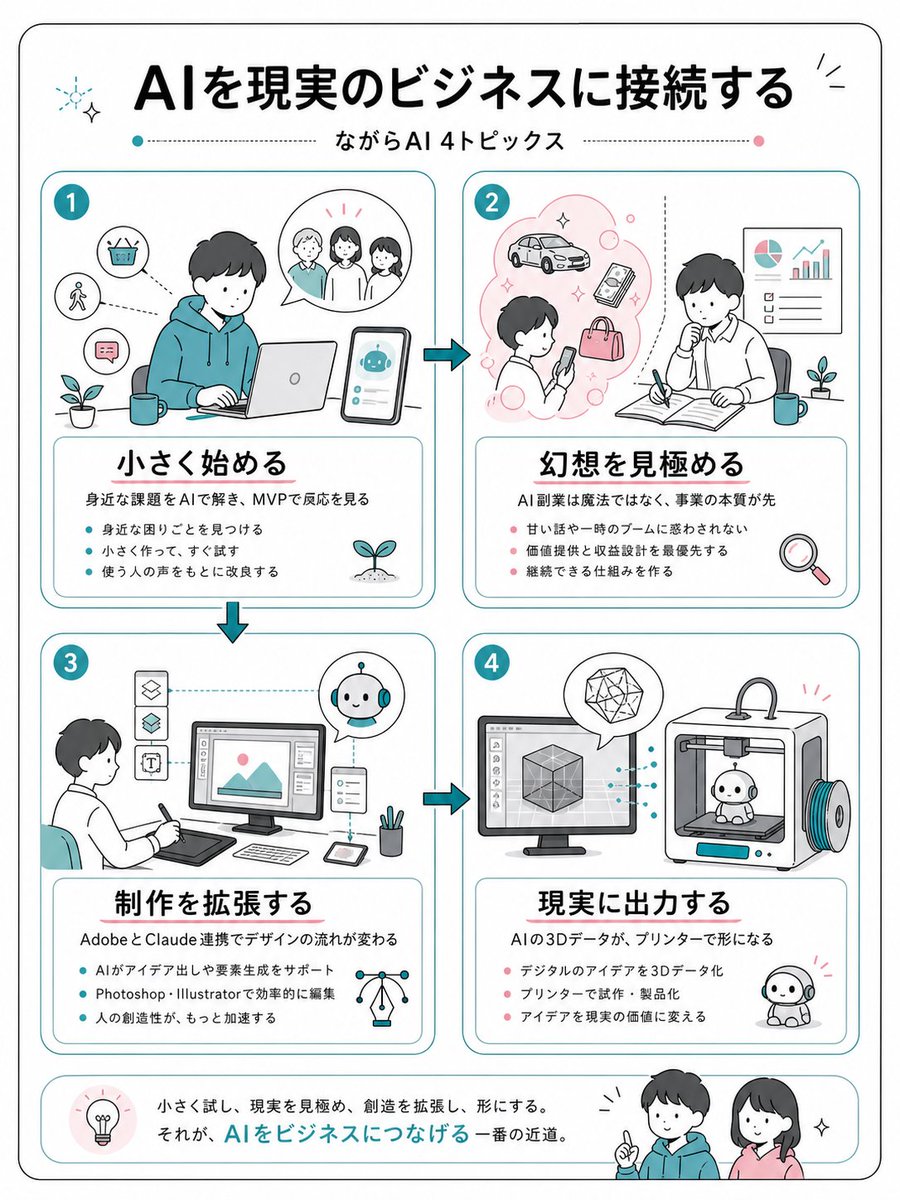
{"type":"clean Japanese business infographic poster","format":"vertical A4-like page with rounded black outer border on white background","style":"friendly flat line illustration, minimal teal and coral accent colors, soft rounded rectangles, hand-drawn business sketch feel, black Japanese gothic headline typography, thin teal dividers, small sparkle and plant icons","language":"Japanese","headline":"{argument name=\"headline text\" default=\"AIを現実のビジネスに接続する\"}","subtitle":"{argument name=\"subtitle text\" default=\"ながらAI 4トピックス\"}","layout":{"top":"large centered headline with small decorative sparkles, subtitle below between dotted horizontal lines with teal and pink dots","main_grid":"four equal rounded cards arranged in a 2 by 2 grid, connected by teal arrow icons showing flow from 1 to 2, down to 3, across to 4","bottom_banner":"rounded summary strip with a lightbulb icon at left, Japanese closing sentence in the center, and two friendly characters at right"},"sections":[{"number":"1","position":"top left","title":"{argument name=\"section 1 title\" default=\"小さく始める\"}","main_illustration":"young person in teal hoodie working on a laptop at a desk, smartphone beside them showing a cute AI robot chat interface, speech bubble with three people, small icons for basket, walking person, chat message, plant and mug","description":"身近な課題をAIで解き、MVPで反応を見る","bullet_count":3,"bullets":["身近な困りごとを見つける","小さく作って、すぐ試す","使う人の声をもとに改良する"]},{"number":"2","position":"top right","title":"{argument name=\"section 2 title\" default=\"幻想を見極める\"}","main_illustration":"person looking at a smartphone inside a pink idea cloud with car, phone, bag and bubbles; second person thinking while writing in an open notebook, wall chart with pie chart and rising bar graph, plant, mug, magnifying glass icon","description":"AI副業は魔法ではなく、事業の本質が先","bullet_count":3,"bullets":["甘い話や一時のブームに惑わされない","価値提供と収益設計を最優先する","継続できる仕組みを作る"]},{"number":"3","position":"bottom left","title":"{argument name=\"section 3 title\" default=\"制作を拡張する\"}","main_illustration":"designer seated with pen tablet facing a desktop monitor showing an image editing interface, vertical tool icons at left, small AI robot assistant in circular bubble, tablet, stylus, pen cup, network lightbulb icon","description":"AdobeとClaude連携でデザインの流れが変わる","bullet_count":3,"bullets":["AIがアイデア出しや要素生成をサポート","Photoshop・Illustratorで効率的に編集","人の創造性が、もっと加速する"]},{"number":"4","position":"bottom right","title":"{argument name=\"section 4 title\" default=\"現実に出力する\"}","main_illustration":"desktop monitor with 3D cube modeling software connected by dotted teal lines to a 3D printer printing a small cute robot figure, geometric crystal in speech bubble, finished robot mascot on the floor","description":"AIの3Dデータが、プリンターで形になる","bullet_count":3,"bullets":["デジタルのアイデアを3Dデータ化","プリンターで試作・製品化","アイデアを現実の価値に変える"]}],"bottom_summary":{"icon":"lightbulb in a pale pink circle","text":"小さく試し、現実を見極め、創造を拡張し、形にする。\nそれが、AIをビジネスにつなげる一番の近道。","characters":"two smiling young people, one in teal hoodie pointing upward and one woman in pink top, with small sparkle marks"},"visual_requirements":"Use exactly 4 numbered topic cards, exactly 3 bullet points in each card, Japanese text must be crisp and readable, maintain generous margins, rounded corners, teal card borders, coral bullet dots in sections 2 and 4, teal bullet dots in sections 1 and 3, no photorealism."}