Case Media
Case Notes
This page keeps the media, full prompt, and original source together so you can inspect the result first and decide whether the prompt is worth copying, saving, or comparing.
Case Insights
To make this page easier to search, cite, and reuse later, the case is also broken down into practical guidance about usage, visual cues, and prompt structure.
Best Fit Scenarios
- Use this as a portrait & photography benchmark when you need a fast style baseline before rewriting your own prompt.
- It is especially helpful if your target overlaps with Portrait, Poster, Character and you want to judge the image result before tuning wording.
- Keep it as a control sample when you compare nearby prompt variants one variable at a time.
Visual Signals To Notice
- The clearest style signals here are Portrait, Poster, Character, so those should usually stay in your first rewrite.
- Focus on framing, light direction, pose, and the distance between subject and camera.
- This case keeps one primary output, so the first image should be treated as the main visual reference.
How The Prompt Is Structured
- The prompt reads as a long, highly specified prompt, which is useful when you want to judge how much specificity this direction needs.
- Its keyword cluster is centered on Portrait, Poster, Character, so you can usually keep that cluster while swapping subject, camera, layout, or copy details.
- A practical rewrite path is: keep the outcome, keep the strongest style cues, then replace only the subject and environment blocks.
Good Follow-up Questions
- What changes first if you keep Portrait, Poster, Character but switch the subject matter?
- Which part of the result comes from section-level structure (Portrait & Photography) versus tag-level style cues?
- Which related cases in the same section give you a cleaner or more extreme variation of the same direction?
Full Prompt
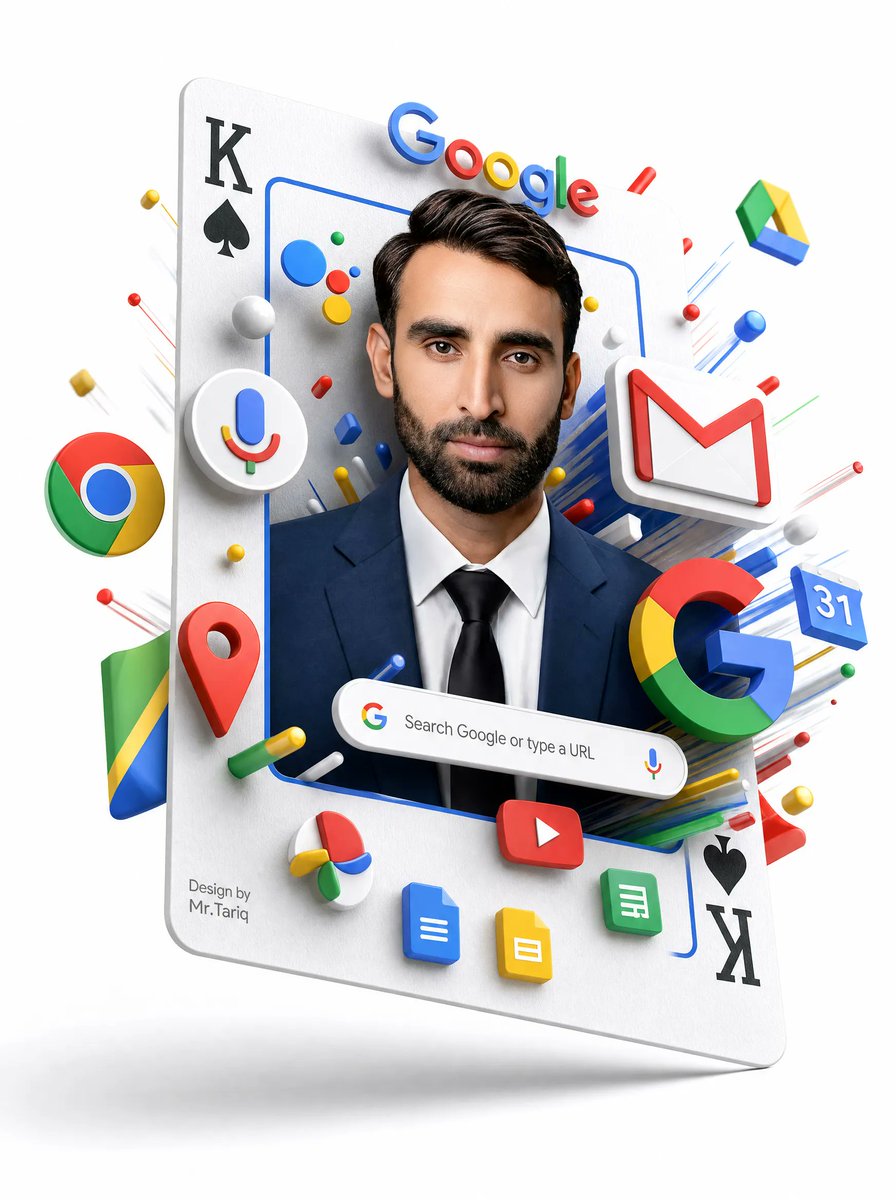
{"type":"3D surreal Google services portrait poster","style":"clean white-background commercial 3D render, glossy plastic icons, realistic studio lighting, soft shadows, floating depth, high-detail advertising composition","main_subject":{"description":"a floating oversized playing card tilted slightly backward, used as a vertical portrait frame","card_details":{"top_left":"black K with black spade symbol","bottom_right":"black spade symbol with black K, rotated upside down","surface":"matte white paper texture with rounded corners and subtle thickness"},"portrait":{"person":"front-facing professional man from chest up wearing a navy business suit, white shirt, and black tie","face":"covered by a centered opaque rectangular blur/mask in medium warm brown, hiding all facial features","hair":"dark neatly styled hair visible above the mask","frame":"thin rounded blue rectangular outline around the portrait"}},"visible_text":{"google_wordmark":"Google","search_bar":"Search Google or type a URL","signature":"Design by\nMr.Tariq"},"custom_parameters":{"headline brand text":"{argument name=\"headline brand text\" default=\"Google\"}","search bar text":"{argument name=\"search bar text\" default=\"Search Google or type a URL\"}","signature text":"{argument name=\"signature text\" default=\"Design by Mr.Tariq\"}","suit color":"{argument name=\"suit color\" default=\"navy blue\"}","face mask color":"{argument name=\"face mask color\" default=\"medium warm brown\"}"},"layout":{"centerpiece":"portrait framed inside the playing card, occupying the central vertical area","top":"large colorful Google wordmark floating above the person's head, casting small shadows","middle":"Google ecosystem icons burst outward around the portrait in layered 3D perspective","bottom":"rounded Google search bar floating across the chest area, with small Google G icon on the left and microphone icon on the right","background":"pure white empty studio background with faint floor shadow below the floating card"},"discrete_elements_count":{"major_google_service_icons":11,"major_google_service_icons_list":["Chrome logo sphere on the left", "Google Assistant microphone icon inside a white circular badge on the left", "Gmail white envelope with red M on the upper right", "Google Drive triangular icon floating upper right", "Google Maps red location pin lower left", "large multicolor Google G lower right", "Google Calendar blue tile showing 31 on the right", "YouTube red rounded rectangle play button near bottom center", "Google Docs blue document icon at bottom", "Google Slides yellow document icon at bottom", "Google Sheets green document icon at bottom right"],"playing_card_corner_markings":4,"playing_card_corner_markings_list":["top-left K", "top-left spade", "bottom-right spade", "bottom-right K"],"search_bar_components":3,"search_bar_components_list":["Google G icon", "search text", "microphone icon"],"small_decorative_objects":"many small red, blue, yellow, green and white spheres, capsules, rods, and streak lines radiating outward; do not make them readable labels"},"composition_instructions":"Create a polished, high-resolution vertical poster. Make the card appear to hover with a soft gray shadow beneath it. Use strong depth layering so icons protrude from the card and surround the portrait. Keep all logos crisp, colorful, and toy-like with beveled edges. Preserve the central face-obscuring rectangle exactly, while keeping hair, ears, suit, and tie visible. Avoid cluttering the background; all action should be concentrated around the floating card."}