Case Media
Case Notes
This page keeps the media, full prompt, and original source together so you can inspect the result first and decide whether the prompt is worth copying, saving, or comparing.
Case Insights
To make this page easier to search, cite, and reuse later, the case is also broken down into practical guidance about usage, visual cues, and prompt structure.
Best Fit Scenarios
- Use this as a model & community benchmark when you need a fast style baseline before rewriting your own prompt.
- It is especially helpful if your target overlaps with Poster, UI, Screenshot and you want to judge the image result before tuning wording.
- Keep it as a control sample when you compare nearby prompt variants one variable at a time.
Visual Signals To Notice
- The clearest style signals here are Poster, UI, Screenshot, so those should usually stay in your first rewrite.
- This kind of case is strongest when you watch deltas: what changed, what broke, and which prompt choice caused that shift.
- This case keeps one primary output, so the first image should be treated as the main visual reference.
How The Prompt Is Structured
- The prompt reads as a long, highly specified prompt, which is useful when you want to judge how much specificity this direction needs.
- Its keyword cluster is centered on Poster, UI, Screenshot, so you can usually keep that cluster while swapping subject, camera, layout, or copy details.
- A practical rewrite path is: keep the outcome, keep the strongest style cues, then replace only the subject and environment blocks.
Good Follow-up Questions
- What changes first if you keep Poster, UI, Screenshot but switch the subject matter?
- Which part of the result comes from section-level structure (Model & Community) versus tag-level style cues?
- Which related cases in the same section give you a cleaner or more extreme variation of the same direction?
Full Prompt
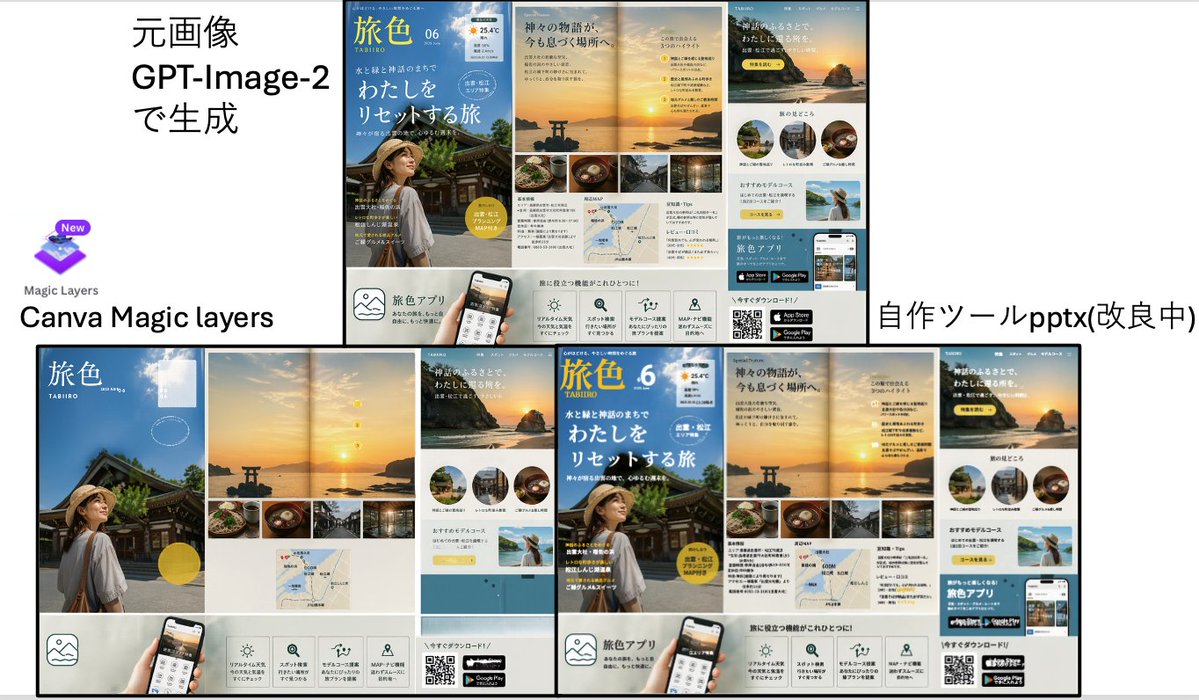
{"type":"comparison presentation slide with two large poster-layout travel advertisements","style":"clean Japanese business presentation, white background, black divider lines, screenshot-like composite layout","canvas":{"aspect_ratio":"16:9","background":"white"},"layout":{"sections":[{"title":"left comparison area","position":"top-left and bottom-left","count":3,"labels":["元画像 GPT-Image-2で生成","Canva Magic layers","Magic Layers"]},{"title":"right comparison area","position":"top-right and bottom-right","count":2,"labels":["自作ツールpptx(改良中)"]}],"dividers":"one thick vertical divider near center and one thick horizontal divider across the middle, with thin black borders around the ad boards","composition":"top row shows source on the left and converted output on the right; bottom row shows enlarged reconstructed layouts side by side"},"text_elements":{"top_left_heading":"元画像 GPT-Image-2で生成","bottom_left_brand":"Canva Magic layers","bottom_right_label":"自作ツールpptx(改良中)"},"embedded_ad_design":{"type":"Japanese travel magazine / tourism app promotional brochure","count":4,"brand_name":"旅色","issue":"06","subtitle":"TABIIRO","theme":"sunset coastal shrine trip in Japan","color_palette":["sky blue","sunset gold","warm beige","white","black"],"main_pages":4,"page_descriptions":["cover page with blue sky background, traditional shrine building, and a woman in a straw hat seen from behind in the lower left, large white Japanese headline text, yellow circular badge, and small weather-style icon at the top right","double-page sunset spread with a torii gate in the water, glowing sun near the horizon, a vertical sequence of 4 small yellow numbered markers, and a bottom strip of 4 rectangular food and travel photos","page featuring a large sunset cliff image with Japanese copy, 3 circular destination thumbnails in a row, a pale yellow recommendation box, and a small scenic photo of a woman raising her arms by the sea","bottom information strip with 5 square feature icons, a smartphone mockup held by a hand, a QR code, and 2 app store badges"]},"visual_details":{"canva_logo":{"present":true,"position":"left center","description":"purple layered square icon with a small New badge above, and the words Magic Layers below"},"reconstruction_difference":"the right-side output arranges the same ad components as separated editable blocks with tighter alignment and visible modularity","ad_components_count":{"circular_thumbnails":3,"bottom_feature_icons":5,"app_store_badges":2,"qr_codes":1,"small_bottom_strip_photos":4}},"rendering":"flat presentation screenshot, crisp typography, high-resolution UI/document mockup aesthetic"}